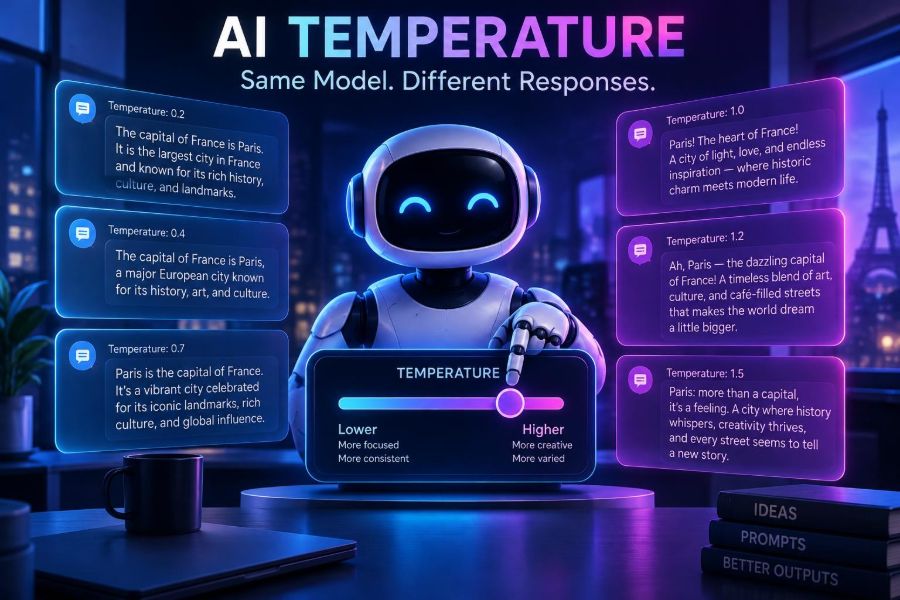

You ask an AI assistant the same question twice, with the same wording, and get two noticeably different answers. One may be concise and practical; another may introduce a fresh metaphor, choose a different example, or take an unexpected path. That is not necessarily a bug. It is often an intentional part of how generative AI works.
Temperature is one of the most important controls behind that variation. It affects how predictably a model chooses its next word, code token, or image-description fragment. Understanding it helps you get repeatable outputs when accuracy matters and more surprising ideas when exploration is the goal.
This matters now because AI is moving from occasional experimentation into real workflows: coding assistants, support bots, content pipelines, research tools, agents, and creative production. A setting that is harmless in brainstorming can create real friction in an extraction workflow or a customer-facing automation.
After reading, you will be able to choose useful temperature ranges, diagnose inconsistent AI results, combine temperature with other generation controls, and build prompts and applications that are more reliable without making them unnecessarily rigid.
🌡️ 1. Temperature Is a Control for Output Randomness
In generative AI, temperature is a sampling control. When a model predicts the next token, it does not usually see only one possible continuation. It calculates a probability distribution across many candidates, then a sampling process chooses one.
A lower temperature makes the selection favor the highest-probability candidates more strongly. A higher temperature spreads opportunity toward less likely candidates, creating more variety and sometimes more risk.
- Low temperature: more consistent, conservative, and focused.
- Medium temperature: a balance between usefulness and variation.
- High temperature: more diverse, imaginative, and unpredictable.
Temperature does not measure intelligence, factuality, emotion, or confidence. It is primarily a dial for how the model samples from possibilities it already considers plausible.
🧠 2. The Model Is Predicting Tokens, Not Retrieving a Fixed Answer
It helps to replace the mental model of an AI as a database with one of an extremely capable next-token predictor. Given your prompt and the conversation so far, it estimates what token is likely to come next.
A token can be a whole word, part of a word, punctuation, a code symbol, or whitespace. The selected token changes the context, and that changes the distribution for the token after it. Tiny early differences can therefore grow into very different paragraphs, plans, or programs.
Imagine the prompt: “Write a slogan for a reusable water bottle.” The model may assign substantial probability to words such as “refill,” “everyday,” “sustainable,” “fresh,” and “future.” There is no single inevitable continuation unless the selection process is made nearly deterministic.
Prompt: Write one slogan for a reusable water bottle.At a low setting, it might repeatedly produce a direct option such as “Refill your day.” At a higher setting, it may produce alternatives with more unusual phrasing, including some excellent ideas and some that are vague or impractical.
🎲 3. Why the Same Prompt Can Produce Different Responses
Temperature is a major reason, but it is not the only one. Even if you copy and paste exactly the same prompt, several sources of variation may be at work.
- Sampling: the system may randomly select among plausible next tokens.
- Model updates: hosted models can change over time, so behavior may shift.
- System instructions: hidden or organizational instructions can affect output.
- Conversation context: previous messages alter what the model sees.
- Tool results: search, databases, code execution, and retrieval may return changing information.
- Infrastructure: some serving systems use settings that prioritize speed or capacity over strict repeatability.
So a low temperature can reduce variation, but it cannot promise identical results in every product or API. If reproducibility matters, record the complete request, model identifier, system prompt, tool outputs, and any seed or deterministic-mode option offered by the provider.
📉 4. What Low Temperature Feels Like in Practice
Low temperature is often the right default for tasks with a clear answer, strict format, or real operational consequences. The model will tend to choose familiar wording and common solution paths.
| Task | Useful tendency | Why |
|---|---|---|
| Extract fields from invoices | Low | Consistency is more valuable than novelty. |
| Summarize a policy | Low to medium | You want faithful coverage and clear phrasing. |
| Generate test cases | Medium | Some variation helps discover edge cases. |
| Brainstorm campaign concepts | Medium to high | Unexpected combinations can be useful. |
| Write experimental fiction | High | Novel voice and associations are part of the goal. |
Low temperature does not guarantee correctness. A model can consistently repeat a mistaken assumption, invent a citation, or misunderstand an ambiguous request. Think of it as stable behavior, not a truth switch.
✨ 5. What High Temperature Feels Like in Practice
Higher temperature makes less probable continuations more available. This can break a model out of stock phrasing and lead to richer creative combinations.
It can also make responses ramble, conflict with your constraints, use inconsistent terminology, or confidently introduce unsupported details. The failure pattern is often not total nonsense; it is a response that is interesting but less dependable.
Prompt: Give me five names for a tiny robot that helps gardeners.At a conservative setting, names may be clear but generic. At a more exploratory setting, you may get playful names, unusual word combinations, or a concept that inspires a product direction. Use that range as a source of candidates, then evaluate rather than blindly publish the first answer.
⚙️ 6. Temperature Changes the Probability Distribution
The technical intuition is that models assign scores, often called logits, to candidate tokens. Before probabilities are calculated, temperature scales those scores. A simplified expression is:
P(token i) = exp(score i / T) / sum(exp(score j / T))Here, T is temperature. When it is below 1, differences between scores become more pronounced, concentrating probability around the leading choices. When it is above 1, the distribution becomes flatter, giving lower-ranked options more chance.
You do not need to calculate this manually. The practical lesson is simple: a temperature change can alter the model’s route at every generation step, and a changed route compounds over a long response.
🎛️ 7. Temperature Is Not the Same as Top-p
Many AI interfaces expose temperature alongside top-p, also called nucleus sampling. They both influence variety, but they do so differently.
Top-p limits selection to the smallest set of tokens whose combined probability reaches a chosen threshold. For example, a setting might exclude a long tail of highly unlikely candidates while still allowing variation among credible ones.
| Control | Main effect | Plain-language question |
|---|---|---|
| Temperature | Reshapes relative probabilities | How strongly should the model favor its top guess? |
| Top-p | Limits the candidate pool by cumulative probability | How far down the plausible-options list may it look? |
| Max output tokens | Caps response length | How much can it say? |
| Seed, where available | Attempts repeatable sampling | Can this random path be replayed? |
A common mistake is aggressively changing both temperature and top-p without knowing which caused the result. Start by adjusting one. Many APIs recommend leaving one at its default while you tune the other; check the provider’s current documentation because accepted ranges and behavior vary.
🧭 8. Pick a Setting Based on the Cost of Variation
Rather than asking, “What is the best temperature?”, ask, “What happens if this response differs?” The answer should guide your setting and your review process.
- High cost of variation: legal intake, data extraction, configuration generation, and production code changes need conservative sampling plus validation.
- Moderate cost: emails, summaries, internal documentation, and learning materials benefit from modest variation with human review.
- Low cost of variation: ideation, naming, story prompts, game concepts, and early design exploration can use wider sampling.
For a customer-support assistant, use a low-to-moderate setting but do not rely on temperature alone. Give it a knowledge source, escalation rules, and a response schema. For brainstorming, generate a batch, score the results, and combine the strongest ideas.
📝 9. Start with a Clear Prompt Before Touching the Dial
Temperature cannot repair an underspecified prompt. If “write something about our product” leads to inconsistent outputs, the biggest improvement often comes from defining the audience, objective, facts, format, and boundaries.
Use this sequence:
- State the task and intended audience.
- Supply the facts or source text the model may use.
- Specify a concrete output format.
- List exclusions and constraints.
- Set temperature for the remaining amount of creative freedom.
You are writing a release-note summary for existing customers.
Use only the facts below. Do not infer features or dates.
Audience: busy operations managers.
Output: three bullets, 18 words or fewer each.
Tone: clear and calm.
Facts: [paste approved facts]
This prompt narrows the possible answer space. A conservative temperature then reinforces consistency, while a higher one is less likely to wander because the task itself is well bounded.
🧪 10. Run a Simple Temperature Experiment
The fastest way to learn is to compare outputs from your own task. Use the exact same prompt and generate several responses at a few settings supported by your tool.
- Choose one representative prompt, not an unusually easy example.
- Create evaluation criteria: accuracy, format compliance, usefulness, tone, and originality.
- Generate several outputs at a low setting.
- Repeat at a middle setting and a higher setting.
- Score the outputs without changing the prompt.
- Select the lowest setting that still delivers the creativity or breadth you need.
Task: Propose three onboarding email subject lines.
Constraints: under 45 characters; no emojis; avoid urgency claims.
Evaluate: clarity, originality, brand fit, constraint compliance.
Do this across a small prompt set, not just one request. A setting that looks perfect for short headlines may behave differently in long-form writing, multilingual output, or code generation.
💻 11. A Minimal API Pattern for Developers
API shapes differ across AI platforms, but the pattern is similar: pass the messages or input, then add generation settings. Keep those settings in configuration rather than scattered through application code.
const response = await client.responses.create({
  model: process.env.AI_MODEL,
  input: [
    { role: "system", content: "Return valid JSON only." },
    { role: "user", content: "Extract name, company, and intent from: ..." }
  ],
  temperature: 0.2,
  max_output_tokens: 300
});
The exact endpoint and parameter names will vary, so consult your provider’s official documentation. More important than syntax is the design: use a lower setting for structured extraction, validate the returned data, and log the configuration used for every production request.
🔁 12. Build Reproducibility into Your Workflow
When someone reports that an AI workflow “changed its mind,” you need enough evidence to reproduce the conditions. Saving only the visible user prompt is rarely enough.
- Store the full system, developer, and user instructions.
- Record model name or identifier and generation parameters.
- Version your prompt templates and retrieval logic.
- Preserve source documents or their immutable references.
- Log tool calls and tool responses where policy permits.
- Capture a seed when the API supports one.
A seed can make sampling more repeatable under similar conditions, but it is not an eternal guarantee. Provider-side changes, model revisions, tool variability, and infrastructure differences can still affect results. Treat it as a debugging aid, not a regulatory-grade audit mechanism.
🧱 13. Use Structured Outputs Instead of Hoping for Consistency
If your software needs predictable fields, do not ask for “a nicely formatted answer” and parse it with fragile string rules. Use a structured output feature or schema mechanism if your AI platform provides one, and validate the result on your side.
Extract the support request into this structure:
{
  "category": "billing | technical | account | other",
  "urgency": "low | medium | high",
  "summary": "string",
  "needs_human_review": true
}
Return only the object. If a field is unknown, use null.
Temperature still matters: lower settings generally reduce formatting drift. But schemas, enum constraints, retries, and application-level validation do far more than temperature alone to make an automation robust.
🧩 14. Separate Creative Generation from Critical Decisions
A reliable pattern is to use two stages. First, generate varied options. Second, evaluate them with stricter instructions and a more conservative setting, ideally against explicit criteria.
Stage 1: Generate 12 landing-page headline concepts.
Aim for distinct angles: speed, trust, simplicity, and collaboration.

Stage 2: Rank these concepts using the criteria below.
Reject claims not supported by the product facts.
Return the top three with one reason each.
This approach gives creativity room to operate without allowing a creative generation pass to become the final decision-maker. For higher-stakes work, have a person approve the shortlist and verify factual claims.
🛠️ 15. Common Temperature Mistakes and Better Fixes
Using zero as a promise of truth
A very low setting may be more repeatable, but it can still hallucinate or misunderstand. Improve source grounding, ask for uncertainty, and verify important outputs.
Turning temperature up to solve boredom
If copy is bland, add stronger creative direction first: desired emotional territory, forbidden clichés, examples of contrast, and a clear audience. Then raise temperature gradually.
Using one global setting for every task
Extraction, code review, brainstorming, and conversational coaching have different risk profiles. Give each workflow its own tested configuration.
Measuring quality by one “wow” answer
Production systems need reliable performance across ordinary inputs. Evaluate batches, edge cases, adversarial inputs, and failure recovery—not just a demo prompt.
🔐 16. Privacy, Safety, and Responsible Use
Temperature affects style and variability, not your responsibility to handle information safely. Do not paste confidential customer data, secrets, credentials, health information, or proprietary code into a tool unless your organization has approved that data flow and retention arrangement.
Higher variability can also increase the chance of surprising language, ungrounded assertions, or policy-breaking output. Put safeguards around sensitive applications:
- Minimize the data sent to the model.
- Use approved access controls and retention settings.
- Validate generated actions before execution.
- Require human review for consequential decisions.
- Test for bias, harmful content, and prompt-injection exposure.
Never let a temperature setting substitute for authorization checks, factual verification, or human accountability.
✅ 17. Quick-Start Checklist
- Define whether your task values consistency, exploration, or both.
- Write a specific prompt with facts, audience, format, and constraints.
- Start conservatively for factual, structured, or customer-facing work.
- Increase variation gradually for ideation and creative alternatives.
- Change temperature or top-p first, not both at once.
- Test multiple representative prompts and score the outputs.
- Use schemas and validation for machine-readable workflows.
- Log prompts, parameters, model details, and tool context.
- Verify high-stakes facts and protect sensitive information.
- Review provider documentation for current parameter behavior.
Temperature is not a quality dial; it is a deliberate trade-off between predictability and possibility. Once you treat it that way, the same model’s changing answers become something you can direct, test, and use with confidence. 🤖🌡️✨