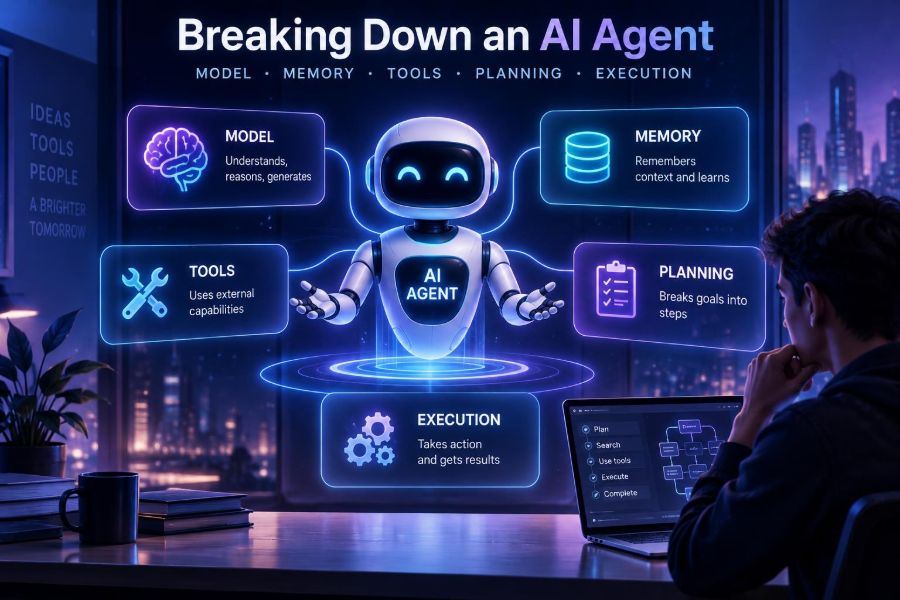

AI agents are moving beyond one-shot chat. Instead of merely answering a question, an agent can inspect a request, gather information, call software tools, keep track of useful context, choose the next action, and report what happened.
That shift matters to everyone building with AI. A creator may want an agent that turns research into a publishing plan. An operations team may need one that triages incoming requests. A developer may be building an assistant that reads a database, creates a ticket, and asks for approval before changing anything.
The word agent can sound like a mysterious autonomous worker. In practice, it is a system made of understandable parts, connected by rules. The model generates judgments and language; memory preserves context; tools let it act; planning organizes work; execution runs the loop safely.
After reading, you will be able to map an agent into its core components, design a useful workflow, write tool descriptions the model can use, add practical guardrails, and build a small agent loop without pretending it is magic.
🧩 1. Define an AI Agent in Plain Language
An AI agent is a software system that uses an AI model to work toward a goal through a sequence of decisions and actions. It observes some state, selects an action, evaluates the result, and continues until it reaches a stopping condition.
A chatbot can be an agent, but not every chatbot is one. A basic chat interface usually produces text only. An agent becomes operational when it can reliably choose among actions such as searching documentation, querying inventory, drafting a message, or requesting human approval.
- Goal: the outcome the system is trying to achieve.
- State: facts available right now, including user input and tool results.
- Actions: model responses, tool calls, or handoffs to people.
- Feedback: tool output, validation results, and user corrections.
🧠 2. Start With the Model, Not the Hype
The model is the reasoning and language component. It interprets instructions, extracts intent, decides which tool may help, converts messy text into structured data, and explains results to a person.
Models do not inherently know your current business data or have permission to perform actions. Their apparent capability depends on the context, tools, instructions, and validation surrounding them.
| Model strength | Useful agent work | Design caution |
|---|---|---|
| Language understanding | Classify, summarize, extract fields | Ask for structured output |
| Reasoning over context | Choose a next step or explain tradeoffs | Keep context relevant and bounded |
| Generation | Draft replies, code, plans, reports | Validate before external use |
| Uncertainty handling | Request missing information | Explicitly allow “I do not know” |
Choose a model after defining the task. Check the official documentation for current context limits, tool-calling formats, data-handling options, latency, and pricing, since these details evolve quickly.
🎯 3. Turn a Vague Wish Into an Agent Contract
“Build an agent that handles support” is not a buildable requirement. Write an agent contract: one narrow job, clear inputs, permitted actions, output format, and explicit boundaries.
Role: Support triage assistant
Goal: Categorize a new request and prepare a draft reply.
Inputs: Customer message and approved knowledge-base excerpts.
Allowed actions: Search the knowledge base; create a draft ticket.
Forbidden actions: Issue refunds, alter accounts, send messages.
Success: A category, urgency, confidence, and draft response.
Escalate when: Identity, payment, safety, or confidence is unclear.
This contract is more important than an elaborate prompt. It tells you what to test, what to log, and where human review belongs.
🗂️ 4. Separate Context From Memory
Context is the information placed in the model request for this turn. Memory is information stored so it can be retrieved later. Confusing the two leads to bloated prompts and agents that remember the wrong things.
A conversation transcript is context only until your application deliberately saves a useful fact. For example, “the user prefers CSV exports” may be useful memory; twenty lines of casual small talk probably are not.
- Working memory: current task details, intermediate results, and recent turns.
- Session memory: information relevant during one project or conversation.
- Long-term memory: durable preferences, policies, or approved facts.
- External knowledge: documents and records retrieved when needed.
🧹 5. Store Less Memory, but Make It Better
Do not save every message merely because storage is inexpensive. Memory can become stale, sensitive, contradictory, or irrelevant. Store compact, attributable facts with an expiration or review strategy.
Use a small schema rather than a free-form diary:
{
  "subject": "user_42",
  "fact": "prefers weekly analytics summaries",
  "source": "explicit user preference",
  "confidence": "high",
  "updated_at": "2025-01-15",
  "expires_at": null
}
Before injecting memory into a prompt, retrieve only facts relevant to the present goal. Let users view, correct, and delete personal memories where appropriate.
🔎 6. Use Retrieval for Knowledge, Not Guesswork
Agents need facts that are current, private, or too detailed to fit in an initial prompt. Retrieval finds relevant material from document stores, databases, or APIs and supplies it as evidence.
A retrieval step commonly converts a query and documents into searchable representations, returns likely matches, then asks the model to answer using those excerpts. This pattern is often called retrieval-augmented generation.
- Clean and segment source documents into meaningful chunks.
- Attach metadata such as owner, date, product, and access level.
- Retrieve a small candidate set for the user’s question.
- Filter by permissions and recency.
- Ask the model to cite or clearly distinguish available evidence.
A common mistake is retrieving too much. Ten mediocre passages can bury one authoritative policy. Optimize for relevance and source quality, not raw volume.
🛠️ 7. Think of Tools as the Agent’s Hands
A tool is a controlled capability exposed to the agent: search, calculator, calendar, database query, file parser, code runner, or an internal business API. Tools give an agent a way to observe and affect the world beyond its training data.
Each tool should do one clear thing. The model needs a name, a plain-language description, a strict input schema, permission limits, and an understandable result.
{
  "name": "lookup_order",
  "description": "Retrieve shipping status for an order the user owns.",
  "input": {"order_id": "string"},
  "returns": {"status": "string", "estimated_delivery": "string"}
}
Do not describe a broad tool as “access company systems.” Specificity makes selection more accurate and makes security reviews possible.
🔐 8. Give Tools Least Privilege
Tool access is where an impressive demo can become a serious risk. A model can misunderstand a request, be influenced by untrusted content, or select the wrong action. Limit what every tool can read, write, and delete.
- Use read-only tools by default.
- Scope credentials to a user, project, or tenant.
- Require confirmation for purchases, publishing, deletion, and permission changes.
- Validate tool arguments on the server, never only in a prompt.
- Log actor, request, action, result, and approval state.
Treat content returned by web pages, emails, and documents as untrusted data. An instruction inside a retrieved document is not automatically an instruction for your agent.
🗺️ 9. Understand Planning as Task Decomposition
Planning means converting a goal into an ordered set of checks and actions. For a simple task, the plan may be implicit: inspect request, call a tool, respond. For a multi-step task, a visible plan can improve reliability and observability.
Goal: Prepare a weekly project update
1. Fetch tasks changed this week.
2. Group work by project.
3. Flag blocked items and missing owners.
4. Draft a concise update.
5. Request approval before posting.
Plans are hypotheses, not commandments. A good agent revises its plan when a tool fails, required data is missing, or a validation check exposes an error.
⚖️ 10. Choose the Simplest Planning Pattern
Not all agents need open-ended autonomy. Simple, explicit workflows are usually easier to test and safer to operate.
| Pattern | Best for | Main tradeoff |
|---|---|---|
| Fixed workflow | Stable, repeatable processes | Less flexible for unusual requests |
| Router | Sending work to specialist flows | Needs clear category definitions |
| Plan then execute | Multi-step research or operations | Can add latency and complexity |
| Iterative agent loop | Tasks with uncertain next actions | Needs strict limits and monitoring |
Start with a fixed workflow or router if you can. Introduce agentic iteration only where the next useful action genuinely depends on results discovered during the task.
🔄 11. Build the Execution Loop
Execution is the runtime loop that turns the model’s chosen action into a real operation. It should be boring, inspectable software: call model, validate decision, execute permitted tool, append result, and stop safely.
state = initialize(user_request)
for step in range(MAX_STEPS):
    decision = model.decide(state, tools=allowed_tools)
    if decision.type == "final":
        return decision.answer
    if decision.type == "tool_call":
        args = validate(decision.args, decision.tool.schema)
        result = run_with_policy(decision.tool, args)
        state.add_tool_result(result)
return "I could not complete this within the allowed steps."
The loop needs timeouts, retries for temporary failures, idempotency for write actions, and a maximum number of steps. Without limits, an agent can waste resources or repeatedly chase the same dead end.
✅ 12. Add Validation Between Thinking and Acting
Never assume well-formed model output is correct. Validation turns a plausible response into a system you can trust more often. Validate both the shape of output and its meaning.
- Schema validation checks required fields and data types.
- Business-rule validation checks permissions, dates, amounts, and ownership.
- Policy validation blocks disallowed categories of action.
- Result validation verifies that a tool actually succeeded.
if action == "send_email" and recipient not in approved_contacts:
    require_human_approval("Recipient is not pre-approved")
if invoice_total > approval_threshold:
    require_human_approval("Amount exceeds threshold")
Prompt instructions are helpful, but they are not enforcement. Put important rules in deterministic application code.
🧑⚖️ 13. Design Human Approval as a Feature
Human-in-the-loop design is not evidence that an agent failed. It is often the right operating model for high-impact actions. Let the system automate preparation and routine checking while a person approves consequential changes.
Make approval screens useful. Show the proposed action, key evidence, tool arguments, affected records, and a clear edit or reject path. Avoid forcing reviewers to reconstruct the entire agent conversation.
Good approval triggers include irreversible actions, financial commitments, external publishing, access changes, low confidence, conflicting sources, and requests outside the agent’s stated contract.
🧪 14. Test Agents With Scenarios, Not Vibes
An agent that works in a pleasant demo may fail when inputs are incomplete, adversarial, old, or ambiguous. Build an evaluation set from real task patterns, sanitized support cases, and deliberately difficult edge cases.
- Happy path: complete request and available data.
- Missing data: agent asks a focused question or escalates.
- Tool failure: agent retries safely or explains the limitation.
- Conflicting evidence: agent identifies uncertainty.
- Prompt injection: untrusted text tries to alter the agent’s rules.
- High-impact request: approval is required before action.
Score observable outcomes: task completion, correct tool choice, valid arguments, policy compliance, escalation quality, and cost or latency. Keep failed traces; they are your best product requirements.
📊 15. Observe What the Agent Actually Did
Agents are difficult to improve if you only store final answers. Capture a trace for each run: request identifier, retrieved sources, tool calls, arguments after redaction, validation outcomes, retries, timing, and final status.
Use traces to answer practical questions: Which tool fails most? Does retrieval cause wrong answers? Does the agent loop after an error? Which cases always need a human?
Protect logs as carefully as production data. Redact secrets and personal data, set retention rules, and limit access to people who need it for operations or debugging.
🧯 16. Handle Failures Gracefully
Tool failures, stale data, rate limits, and ambiguous requests are normal. The agent should not invent completion when a dependency is unavailable. It should report what it knows, what failed, and the safest next option.
Tool result: calendar service unavailable
Good response: “I could not check availability right now. I have not created an event. Please try again, or provide times you want me to draft.”
Common mistake: retrying every error indefinitely. Categorize errors into temporary, permanent, permission-related, and validation-related, then define a different response for each.
🛡️ 17. Protect Privacy and Use Agents Responsibly
Agents can combine sensitive data with the ability to act, so privacy and security need to be part of the architecture from day one. Collect only information needed for the task and avoid sending sensitive data to unnecessary tools or providers.
- Classify sensitive fields before building prompts and logs.
- Apply access control before retrieval, not after generation.
- Encrypt data in transit and at rest using your organization’s standards.
- Offer notice and meaningful control when storing user preferences.
- Review automated decisions for bias, errors, and disproportionate impact.
For legal, medical, employment, financial, or safety-sensitive uses, involve qualified domain experts and follow applicable policies and regulations. An agent should support accountable decisions, not conceal responsibility.
🏗️ 18. Build a Small Agent Before a General One
A practical first project is a research-and-draft agent with no authority to send or publish. It can accept a topic, retrieve approved sources, produce a structured outline, and flag uncertainties for a human editor.
- Pick one measurable outcome, such as “produce a sourced outline.”
- Use one model, one retrieval source, and one read-only search tool.
- Define a JSON output format for the draft and uncertainty list.
- Add a five-step maximum and a clear stop condition.
- Review traces from a small set of real tasks.
- Add capabilities only when failure evidence justifies them.
This approach creates a dependable foundation. A narrow agent that finishes 80 percent of one safe task is more valuable than a general agent that unpredictably touches everything.
🚀 19. Quick-Start Checklist
- Write one narrow agent contract with a goal and boundaries.
- Choose the model based on task requirements, then verify current capabilities in official documentation.
- Keep working context short and retrieve durable knowledge on demand.
- Expose small tools with strict schemas and least-privilege access.
- Start with a fixed workflow before adopting an open-ended loop.
- Validate every tool argument in application code.
- Require human approval for consequential or irreversible actions.
- Set step limits, timeouts, retry rules, and safe failure messages.
- Test edge cases, prompt injection attempts, and unavailable tools.
- Log traces securely and use failures to improve the design.
The most useful AI agents are not the ones that appear most autonomous; they are the ones whose model, memory, tools, planning, and execution are deliberately constrained, observable, and trustworthy. Build the smallest safe loop, measure it, and expand with evidence. 🤖🧭🚀