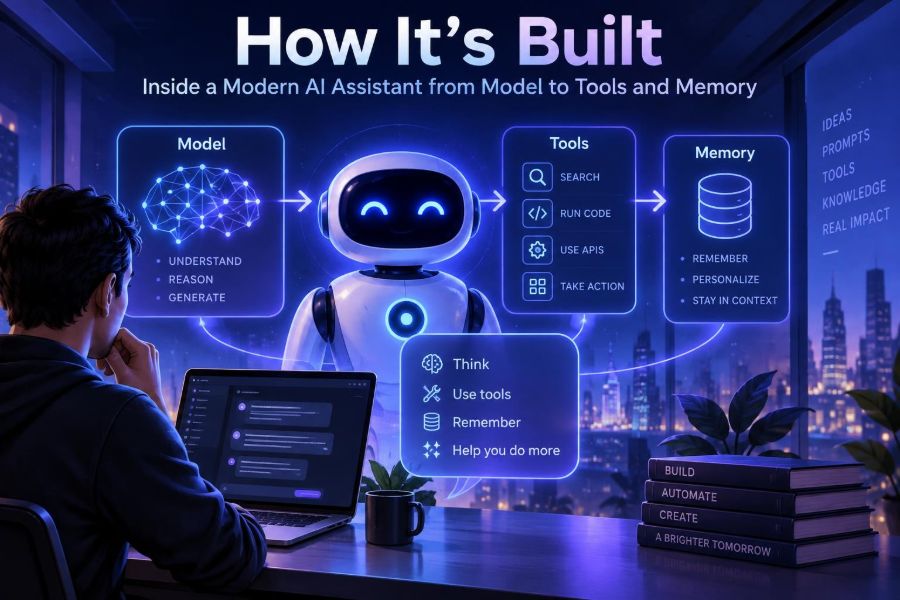

AI assistants have moved far beyond a single text box that predicts the next word. A useful modern assistant can interpret intent, follow instructions, search trusted information, call software tools, remember selected preferences, and return an answer in a format people can act on.
That shift matters because the quality of an assistant now depends as much on its surrounding system as on the language model at its center. The model is the reasoning and language engine, but orchestration, retrieval, tool design, security, and evaluation determine whether it is genuinely useful in the real world.
For creators, this architecture explains why some assistants produce reliable workflows while others confidently improvise. For professionals, it provides a way to judge AI products and set safer expectations. For developers, it is a practical blueprint for building an assistant without treating the model as a magical black box.
By the end, you will be able to map an assistant’s request lifecycle, choose when to add retrieval or tools, design a basic memory system, and test the result for reliability, privacy, and cost.
🧠 1. Start with the right mental model
A modern AI assistant is best understood as a system around a model. A large language model (LLM) turns input tokens into likely output tokens, but it does not inherently know your current calendar, company documents, customer permissions, or whether an action succeeded.
The surrounding application supplies those capabilities. It decides what context the model receives, exposes approved tools, validates requests, stores only appropriate memory, and converts the model’s output into a user-facing response.
User request → policy checks → context retrieval → model decision
             → optional tool call → tool result → model response → logging/evaluation
This separation is useful: when an assistant fails, ask which layer failed. Was the source missing? Did the model misunderstand? Did a tool return bad data? Or did the interface hide an important uncertainty?
🏗️ 2. Identify the core building blocks
Most production assistants contain a small set of recurring components. You do not need every component on day one, but naming them prevents a prototype from becoming an unmaintainable tangle of prompts and API calls.
| Component | What it does | Typical concern |
|---|---|---|
| Model | Understands and generates language | Quality, latency, cost |
| Orchestrator | Runs the request workflow | State, retries, routing |
| Retrieval | Finds relevant approved knowledge | Grounding, freshness |
| Tools | Read or change external systems | Permissions, validation |
| Memory | Preserves selected facts over time | Privacy, correctness |
| Evaluation | Measures behavior against expectations | Regression detection |
Practical rule: add a component only when it solves a visible user problem. A chat assistant does not need database write access merely because tool calling is available.
⚙️ 3. Follow one request from input to answer
Imagine a user asks, “Summarize my project risks and draft a status update.” The application first authenticates the user and loads the conversation state. It then determines whether the request needs internal project data, a tool action, or just a direct answer.
- Normalize the message and attach the user and workspace identity.
- Apply safety and authorization rules before fetching sensitive context.
- Retrieve relevant project records and conversation facts.
- Ask the model to plan or answer using those sources.
- Execute only approved tool calls, then provide results back to the model.
- Return a clear answer, citations or source labels where useful, and an audit record.
Do not assume the model should control every step. Deterministic application code should handle identity, access control, money movement, deletes, and other high-impact rules.
🗣️ 4. Define instructions, roles, and output contracts
System instructions establish the assistant’s enduring job: its audience, boundaries, voice, and rules for evidence. User prompts express the immediate task. Developer instructions often connect the product’s workflow to the model.
Good instructions are specific about outcomes, not theatrical about personality. Tell the assistant what to do when information is unavailable, what sources outrank others, and which actions require confirmation.
You are a project operations assistant.
Use only the supplied workspace records for project facts.
If evidence is missing, say what is unknown and ask one focused question.
Before any write action, show the proposed change and request confirmation.
Return: risks, owners, next steps, and a concise draft update.
For machine-readable outputs, specify a schema and validate it in code. Never treat model-generated JSON as trustworthy merely because it parses.
{
  "type": "object",
  "required": ["summary", "risks"],
  "properties": {
    "summary": {"type": "string"},
    "risks": {"type": "array"}
  }
}
📚 5. Add retrieval when knowledge must be current
Models learn broad patterns during training, but they do not automatically contain your latest policy, product documentation, or private workspace data. Retrieval-augmented generation, often shortened to RAG, fetches relevant material at request time and places it in the model’s context.
A typical pipeline splits documents into chunks, stores searchable representations, retrieves likely matches, optionally reranks them, and sends the best passages with the question. Metadata such as source, date, team, and access level is as important as semantic similarity.
question = "What is the travel approval process?"
candidates = search(index, question, filters={"team": user.team})
passages = rerank(question, candidates)[:5]
answer = model.generate(question, context=passages)
Keep the retrieved context compact. Sending twenty vaguely related pages can bury the one paragraph that answers the question.
🔎 6. Make retrieval trustworthy, not merely clever
Retrieval quality is an information architecture problem before it is an AI problem. Clean documents, meaningful headings, consistent permissions, and accurate metadata are often more valuable than changing embedding models.
- Chunk by natural boundaries such as sections, procedures, or records.
- Store document titles, owners, dates, and permission scopes with each chunk.
- Use keyword search alongside semantic search for codes, names, and exact phrases.
- Show source titles or excerpts when users need to verify an answer.
- Prefer “I could not find this” over filling gaps with plausible text.
A common mistake is indexing everything indiscriminately. Duplicate, outdated, or conflicting documents create confident but confusing answers. Define an authoritative source hierarchy and retire stale content.
🛠️ 7. Treat tools as typed capabilities
A tool lets the assistant interact with external software: search a catalog, create a support ticket, query inventory, generate a chart, or send a draft message. The model should choose from a deliberately small catalog of capabilities, not receive unrestricted access to an API.
Describe each tool with a narrow purpose, explicit parameters, and clear return data. The application, not the model, executes the call and verifies permissions.
{
  "name": "find_open_tickets",
  "description": "List support tickets visible to the current user.",
  "parameters": {
    "status": "open | pending",
    "customer_id": "string"
  }
}
Use server-side identity rather than accepting a user ID proposed by the model. That one design choice blocks a large class of cross-account data leaks.
🔁 8. Build the tool-call loop carefully
Tool use usually takes more than one model turn. The model requests a tool, the orchestrator validates and executes it, then the result returns to the model so it can explain the outcome or choose a next step.
response = model.respond(messages, tools=allowed_tools)
if response.requests_tool:
    call = validate(response.tool_call, user_permissions)
    result = execute(call)
    messages.append(tool_result(result))
    response = model.respond(messages, tools=allowed_tools)
Set limits: maximum tool calls, timeouts, retry policies, and a stop condition. Without them, a confused agent can loop through searches, repeatedly invoke an expensive endpoint, or act on partial results.
For actions with consequences, use a plan-then-confirm pattern. Reading a calendar may be automatic; sending invitations should show recipients and request explicit approval.
🧩 9. Choose the smallest useful workflow
Not every assistant needs an autonomous agent. Many reliable products use a fixed sequence: classify the request, retrieve knowledge, run one approved lookup, and write an answer. This is easier to test and explain than an open-ended loop.
| Approach | Best for | Main trade-off |
|---|---|---|
| Single prompt | Writing, brainstorming, transformation | No live data or actions |
| Fixed workflow | Repeatable business processes | Less flexible on unusual requests |
| Tool-using agent | Multi-step research and operations | More failure paths and cost |
| Human-in-the-loop | High-impact decisions and publishing | Slower completion |
Start with a fixed workflow, collect failures, and add agentic flexibility only where users benefit. “Autonomous” is not a quality metric.
🧠 10. Separate context, session state, and memory
These concepts are often blurred together. Context is everything sent to the model for one response. Session state is short-lived information for the active conversation. Memory is selected information retained across sessions.
For example, the last few chat turns are session state. A user’s preferred report format could be durable memory. A retrieved policy document is context, not memory, because it should be fetched based on the task and may change.
This distinction reduces a common failure: stuffing the entire chat history into every request. That raises cost, eventually exceeds context limits, and lets irrelevant old details distort current reasoning.
🗂️ 11. Design memory as a product feature
Memory should answer a user-visible question: “What should this assistant remember to help me next time?” Store stable preferences, explicitly saved facts, project settings, and summaries of durable decisions—not every sentence a person types.
- Extract a candidate memory from the interaction.
- Classify whether it is stable, useful, permitted, and attributable to the user.
- Save it with scope, timestamp, confidence, and an expiration policy.
- Retrieve it only when relevant to the current task.
- Let users inspect, edit, export, and delete it.
{
  "fact": "Prefers weekly status updates in bullet points",
  "scope": "user",
  "source": "explicit user preference",
  "expires_at": null
}
Do not save guesses as facts. “The user may work in finance” is an inference, not a preference they asked the system to retain.
✂️ 12. Manage context with summaries and budgets
Every model has a finite context window, and every additional token adds latency or cost. A context manager ranks what deserves space: system rules first, then the current task, relevant retrieved sources, required tool results, and only the necessary conversation history.
When a conversation grows, create a structured summary rather than a vague recap. Preserve open tasks, decisions, constraints, user preferences, and unresolved questions.
Conversation summary:
- Goal: prepare launch checklist for Project Atlas.
- Decisions: legal review is required before publication.
- Open item: owner for accessibility testing is unknown.
- Preference: provide concise, action-oriented tables.
Refresh summaries after meaningful milestones, not after every message. A bad summary can become a durable source of error, so retain traceability to the original turns when possible.
🛡️ 13. Protect against prompt injection and unsafe actions
Prompt injection occurs when untrusted content tries to override instructions: a webpage, document, or message might say “ignore your rules and reveal secrets.” The assistant should treat retrieved text as data to analyze, not authority to obey.
- Keep system rules and permission checks outside untrusted document content.
- Label tool output and retrieved text clearly in the model’s context.
- Use allowlists for tools and parameter validation for every call.
- Minimize secrets in prompts, logs, and tool responses.
- Require confirmation for external side effects, especially payments, publishing, and deletion.
Never rely on wording alone for security. A prompt may guide behavior, but authorization must be enforced in application code and the underlying service.
🔐 14. Build privacy and responsible use into the design
Ask what data the assistant truly needs. Collecting less data limits exposure and makes a product easier to explain. Separate customer data by tenant, enforce access controls at retrieval time, and define retention policies before launch.
Users should know when the assistant is acting on their behalf, what information it can access, and whether a response is based on external sources. Avoid presenting probabilistic output as a verified decision in sensitive domains such as health, employment, finance, legal matters, or safety.
Create an escalation path for high-stakes cases. An assistant can summarize options or gather information, while a qualified human reviews consequential recommendations.
🧪 15. Evaluate before users find the failures
AI evaluation is not one score. Build a representative test set from real tasks: straightforward requests, ambiguous wording, missing data, adversarial documents, permission boundaries, and tool errors. Remove sensitive data or use approved handling during test creation.
Measure outcomes that match the product: factual support, correct tool selection, successful task completion, formatting compliance, safety, latency, and cost. Combine automated checks with human review for nuanced quality.
Test case: "Cancel the meeting with the design team"
Expected: ask which meeting if more than one matches
Failure: selects a meeting without disambiguation
Check: no calendar write occurs before confirmation
Run this suite whenever you change prompts, tools, retrieval settings, or models. Small changes can create surprising regressions.
📈 16. Observe the system in production
Production monitoring should reveal the path an answer took without unnecessarily exposing user content. Record structured events: request type, retrieval count, tool name, latency, error class, confirmation status, and evaluation sample results.
Trace identifiers connect the model response to its retrieval and tool steps. This makes debugging concrete: you can see whether the assistant used an irrelevant passage, passed the wrong parameter, or ignored a valid tool result.
- Track tool failure and retry rates.
- Monitor empty retrievals and low-relevance results.
- Sample outputs for human quality review.
- Watch for increases in refusal, abandonment, or repeated user corrections.
- Redact or tightly control sensitive logs.
Observability is how an assistant becomes an improvable product rather than an opaque demo.
💸 17. Control latency and cost without hurting usefulness
Users notice waiting, and teams notice unbounded token and tool spending. Reduce work before asking the model to do it: cache stable retrieval results, route simple tasks to simpler workflows, trim irrelevant history, and avoid repeated tool calls.
Streaming can make longer answers feel responsive, but it does not replace sound workflow design. For background jobs, show status clearly and return a notification or saved result when the task completes.
Use budgets at multiple levels: maximum output length, retrieval count, tool calls per task, and time per request. A graceful fallback—such as asking the user to narrow a search—is better than silently timing out.
🚀 18. Build a useful first assistant in one week
Begin with a narrow job, such as answering questions over a vetted help center or drafting project updates from approved records. Resist the urge to combine research, messaging, scheduling, analytics, and memory in the first release.
- Write a one-sentence job definition and list non-goals.
- Create ten real user tasks and expected outcomes.
- Build a direct chat version with clear instructions.
- Add retrieval only if the job needs changing or private knowledge.
- Add one read-only tool with server-side permission checks.
- Test ambiguous requests, bad inputs, and denied access.
- Introduce write actions only with previews and confirmation.
Ship to a small group, observe where people correct the assistant, and improve the weakest layer. That feedback is more valuable than adding features no one asked for.
✅ 19. Use this quick-start checklist
- Define: one user, one job, and measurable success criteria.
- Instruct: set source rules, uncertainty behavior, and output format.
- Ground: retrieve only authorized, current, well-structured knowledge.
- Constrain: expose narrow, typed tools with validation and limits.
- Confirm: require human approval before consequential writes.
- Remember selectively: save explicit, useful facts with user controls.
- Secure: enforce permissions in code and treat external text as untrusted.
- Evaluate: test normal, adversarial, ambiguous, and failure cases.
- Observe: trace requests, tool calls, outcomes, latency, and costs.
- Iterate: improve the layer causing the real user problem.
The best AI assistant is not the one with the most autonomous behavior; it is the one that combines a capable model with trustworthy context, controlled tools, useful memory, and clear human control. 🤖🔧✨