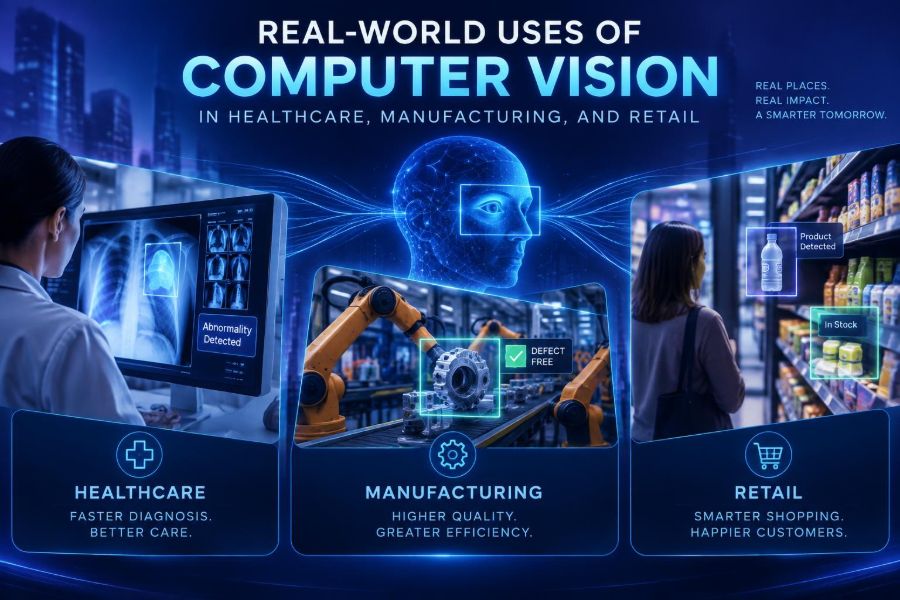

Computer vision has moved from laboratory demos to cameras, edge devices, and everyday operational workflows. It helps machines turn images and video into useful signals: an alert, a count, a measurement, a search result, or a recommended human action.
This matters now because organizations collect more visual data than people can manually review. Meanwhile, better pretrained models, smaller deployment options, and practical integration patterns have made many focused vision projects achievable without building a research lab.
The important word is focused. High-value systems rarely begin with “understand everything in this video.” They begin with a concrete question such as: Is a worker wearing required protective equipment? Is a shelf empty? Does this medical image need priority review?
After reading, you will be able to identify viable computer-vision opportunities in healthcare, manufacturing, and retail; choose an appropriate technical approach; design a small pilot; and avoid common accuracy, privacy, and workflow mistakes.
👁️ 1. What computer vision actually does
Computer vision is software that extracts meaning from images, video, or camera streams. A system may classify an entire image, locate an object, track movement, read text, segment an area pixel by pixel, or flag an unusual pattern.
| Task | Question answered | Example |
|---|---|---|
| Classification | What is in this image? | Is a package damaged? |
| Detection | Where are the objects? | Where are products on a shelf? |
| Segmentation | Which pixels belong to an object? | What is the area of a wound? |
| OCR | What text is visible? | What is the lot number? |
| Tracking | How does an object move over time? | How long did a queue remain open? |
| Anomaly detection | What looks unusual? | Is a part unlike normal production? |
Vision is not automatically “AI that sees like a person.” It is a probabilistic system optimized for a defined task, trained or configured using examples from a particular environment.
🎯 2. Start with a decision, not a camera
A camera feed is only an input. The business value comes from a decision that someone can make faster, more consistently, or more safely.
Write the workflow in one sentence: When the system observes X, it sends Y to person or system Z, who takes action A. This prevents expensive projects that merely produce dashboards.
Decision statement:
When a conveyor camera detects a missing label,
create an inspection event for the line operator,
who checks the item before it enters the shipping lane.- Choose a measurable outcome: defects caught, stockouts reduced, review time saved, or wait time lowered.
- Define what happens when confidence is low.
- Identify the cost of a false alarm and the cost of a missed event.
- Confirm that the people receiving alerts can act in time.
🏥 3. Healthcare: triage and image-worklist support
One of the most useful roles for vision in healthcare is prioritization, not autonomous diagnosis. Imaging workflows can use algorithms to highlight studies that may need faster expert review, helping clinical teams organize queues under time pressure.
Systems can also quantify image features, compare studies over time, or check whether an acquired image meets technical quality criteria. In pathology, dermatology, radiology, ophthalmology, and endoscopy, visual analysis can help surface regions worth closer examination.
A safe workflow keeps a qualified clinician in control. The model output should be understandable as a cue, overlay, measurement, or worklist signal rather than a hidden, unchallengeable conclusion.
🩺 4. Healthcare: bedside, operations, and documentation
Computer vision can also assist operational tasks around care. Examples include detecting hand-hygiene workflow events, measuring room turnover steps, monitoring occupancy in non-clinical spaces, and extracting structured information from forms or labels.
At the bedside, the stakes are higher. Fall-risk monitoring, patient-position checks, or line-and-tube visibility projects require rigorous clinical governance, careful privacy design, and a clear escalation path.
- Lower-risk starting point: document scanning, supply tracking, or equipment availability.
- Moderate-risk starting point: workflow timing with de-identified or tightly controlled footage.
- High-risk use: any output that influences diagnosis, treatment, or urgent intervention.
For regulated medical uses, validation, documentation, and approval requirements vary by location and intended use. Consult clinical leadership, privacy teams, and the relevant regulator rather than assuming a general-purpose model is suitable.
🏭 5. Manufacturing: automated visual inspection
Manufacturing is a strong fit for computer vision because many tasks are repetitive, visual, and tied to clear quality standards. A camera can inspect seals, surface finish, assembly completeness, printed codes, welds, solder joints, packaging, and dimensions.
Traditional rule-based vision works well when lighting, part position, and appearance are highly controlled. Learning-based models are often more robust when acceptable variation is broad or defect shapes are difficult to describe with hand-written rules.
A practical design uses vision as a gate or recommendation layer. The system may stop a line for high-confidence critical defects, route uncertain items to manual inspection, and log images for continuous improvement.
🧰 6. Manufacturing: safety, inventory, and process visibility
Beyond quality control, manufacturers use vision to verify PPE, detect restricted-zone entry, count work-in-progress, read container labels, and confirm that a process step occurred. These applications can connect visual observations to manufacturing execution, maintenance, or warehouse systems.
Be cautious with worker monitoring. A safety project should focus on reducing hazards, not building a punitive surveillance system. Involve workers and safety representatives early, state what is measured, limit retention, and avoid collecting more personal data than necessary.
Example event payload
{
  "event": "pallet_count_changed",
  "zone": "outbound_lane_3",
  "count": 14,
  "confidence": 0.93,
  "captured_at": "timestamp"
}
This event is more useful than storing endless video because it is structured, auditable, and easy to route into an existing workflow.
🛍️ 7. Retail: shelves, availability, and planogram checks
Retail vision often begins with the shelf. A camera or associate-held device can detect gaps, estimate facings, verify product placement, and flag planogram mismatches. These signals help teams prioritize replenishment rather than manually inspect every aisle.
The hard part is distinguishing a truly empty position from a product hidden by glare, shopper activity, poor camera angle, or a changed package design. Good systems compare observations with store layout and inventory context instead of treating every blank-looking region as a stockout.
- Start with a small category where packaging is visually distinct.
- Capture images at consistent angles and times.
- Send tasks to the store team, not just a central dashboard.
- Measure confirmed stockouts and completed replenishment actions.
🧾 8. Retail: checkout, loss prevention, and customer flow
Vision can help verify items at self-checkout, identify scanning exceptions, estimate queue length, and measure traffic patterns. It can also support age-restricted product workflows where legally permitted and carefully governed.
Loss-prevention use demands particular restraint. A model’s alert should trigger review by trained staff, not automatic accusations or confrontations. Demographic performance differences, lighting, occlusion, and biased historical labels can create serious harms.
For traffic analytics, aggregate counts and dwell-time trends are often enough. Avoid identifying individuals when anonymous movement statistics will answer the operational question.
🧠 9. Pick the right model pattern
You do not always need to train a giant custom model. The best option depends on the stability of your visual environment, the availability of labels, latency needs, and the consequence of errors.
| Pattern | Best fit | Watch for |
|---|---|---|
| Rules and geometry | Fixed cameras, known shapes, controlled lighting | Brittle under layout changes |
| Pretrained detection model | Common objects and fast prototypes | May miss domain-specific objects |
| Fine-tuned model | Distinct products, parts, or conditions | Needs representative labeled data |
| Anomaly detection | Many normal examples, rare defects | “Unusual” is not always defective |
| Multimodal vision-language model | Flexible review, search, and assisted labeling | Needs grounding and strict evaluation |
Vision-language models can describe images and answer natural-language questions, but they may make confident mistakes. Use them as assistants, especially for exploration or human review, and validate them against the actual task.
📸 10. Build a dataset that matches reality
Data quality usually determines project quality. Collect examples from the actual cameras, locations, products, and conditions that the system will encounter.
- List the visual conditions: day and night, glare, motion blur, occlusion, seasonal packaging, different uniforms, and camera angles.
- Define labels precisely. For example, does a “damaged package” include a dent, a torn seal, or only exposed contents?
- Sample normal cases, difficult negatives, and rare critical cases.
- Split training and test data by time, site, camera, or production batch where possible.
- Have domain experts review label consistency before training.
A common mistake is randomly splitting near-duplicate frames from the same video into training and testing sets. The result can look excellent in evaluation yet fail on a new shift, store, or factory line.
🏷️ 11. Label data with a useful taxonomy
Labels translate operational definitions into training signals. For detection, reviewers draw bounding boxes; for segmentation, they outline pixels; for classification, they choose a category for each image.
Keep the taxonomy small at first. If reviewers cannot consistently tell the difference between five types of scratches, begin with “acceptable,” “needs review,” and “critical defect.” You can add granularity after proving the workflow.
Labeling guide excerpt
Class: missing_cap
Include: container with no cap visible in expected position
Exclude: cap hidden by another object; uncertain image
Action for uncertain: label review_needed
Track inter-reviewer agreement. If experts disagree frequently, the problem may be ambiguous rather than the model being weak.
⚙️ 12. Prototype the pipeline step by step
A minimal pipeline receives an image, preprocesses it, runs inference, applies business rules, and records an event. Keep each layer separate so teams can inspect failures.
image = camera.read()
image = preprocess(image)
predictions = model.predict(image)
valid = [p for p in predictions if p.confidence >= 0.80]
result = apply_business_rules(valid)
store_event(result)
if result.requires_review:
    notify_operator(result)
The confidence threshold is not a universal magic number. Set it after examining the precision and recall trade-off for your task. A critical safety defect may require a threshold that favors catching more possible defects, with human review absorbing extra alerts.
For a prototype, save representative inputs, predictions, final human decisions, and model version identifiers. That record makes it possible to debug a bad alert months later.
🖥️ 13. Choose cloud, edge, or hybrid deployment
Cloud inference can simplify centralized model updates and analytics, but it depends on connectivity and may add latency or data-transfer concerns. Edge inference runs near the camera, often reducing delay and keeping footage local.
A hybrid design commonly performs immediate detection at the edge, transmits only events or selected review images, and uses central infrastructure for training, monitoring, and reporting.
- Use edge processing for line-stop decisions, sensitive imagery, or unreliable networks.
- Use centralized services when many sites need shared operations and model management.
- Budget for camera placement, lighting, cleaning, networking, mounting, and maintenance—not only model compute.
📏 14. Evaluate with operational metrics
Accuracy alone can hide the problems that matter. Evaluate precision, recall, false-positive rate, false-negative rate, latency, uptime, and performance across sites and conditions.
Translate model metrics into business terms. If a system catches 95% of defects but sends 400 unnecessary alerts per shift, operators may stop trusting it. If it catches fewer defects but reduces manual inspection by half without increasing escapes, it may be valuable.
Review questions
- Of 100 alerts, how many were truly actionable?
- Of 100 real events, how many did we catch?
- How long until a person received the alert?
- Does performance change by camera, shift, store, or lighting condition?
- What action was taken, and did it improve the outcome?
🔄 15. Design the human-in-the-loop experience
People should receive enough context to make a rapid, informed choice. An alert should show the relevant image region, confidence or priority, timestamp, location, and recommended next action.
Make feedback one click where possible: confirm, reject, escalate, or mark unclear. Those decisions become valuable evaluation data and can support later retraining.
Do not overwhelm users with every detection. Group repeated alerts, suppress duplicates, and escalate only when the event is actionable. Alert fatigue is a product-design failure, not a user failure.
🔒 16. Privacy, security, and responsible use
Camera data can reveal sensitive information about patients, employees, shoppers, and bystanders. Apply data minimization: collect only what is needed, process locally when practical, retain footage for the shortest justified period, and restrict access.
- Publish a clear purpose statement for each camera and model.
- Use role-based access, encryption, audit logs, and secure update procedures.
- Mask, blur, or avoid faces and identifiers when they are not necessary.
- Assess disparate error rates and consequences across relevant groups.
- Provide human review and an appeal or correction process where decisions affect people.
Never deploy facial recognition, emotion inference, medical-risk scoring, or employee scoring casually. These uses raise legal, ethical, and reliability concerns that demand specialized review and may be restricted in some jurisdictions.
🧯 17. Common failure modes and fixes
Failure: Great demo, poor live results. The prototype used clean images, while live cameras have dirt, glare, vibration, and occlusion. Fix it with site-specific data and a pre-deployment camera audit.
Failure: The model detects the wrong shortcut. It learns a background, label color, or camera watermark rather than the defect. Test across locations and use visual inspection methods to check what the model attends to.
Failure: Nobody acts on alerts. The system has no owner, no service-level expectation, or no simple action. Assign responsibility and build the alert into existing tools.
Failure: Performance drifts. New packaging, uniforms, equipment, or lighting changes alter inputs. Monitor distributions and human-confirmed outcomes, then refresh data and retrain when justified.
🚀 18. Run a 30-day pilot
A short pilot should prove a specific operational hypothesis, not solve every vision problem at once.
- Week 1: choose one decision, map the workflow, assess privacy, and inspect camera conditions.
- Week 2: collect representative samples, write labeling rules, and establish a manual baseline.
- Week 3: test a simple model or rules-based approach offline against held-out data.
- Week 4: run in shadow mode, where alerts are reviewed but do not yet trigger automated action.
At the end, compare the system with the baseline: incidents found, review time, false alerts, user acceptance, and implementation cost. Decide whether to stop, refine, or expand based on evidence rather than enthusiasm.
✅ 19. Quick-start checklist
- Choose one visual event tied to a real decision.
- Define the owner, action, and acceptable response time.
- Estimate the harm of false positives and false negatives.
- Capture data from the real deployment environment.
- Create a concise labeling guide and review disagreements.
- Start with the simplest model pattern that can work.
- Evaluate by site, condition, and operational outcome.
- Run in shadow mode before automating consequences.
- Protect privacy with minimal collection, access controls, and retention limits.
- Monitor drift, collect feedback, and improve continuously.
The strongest computer-vision projects do not replace judgment; they give people timely, trustworthy visual evidence so they can make better decisions. 🤖👁️🚀