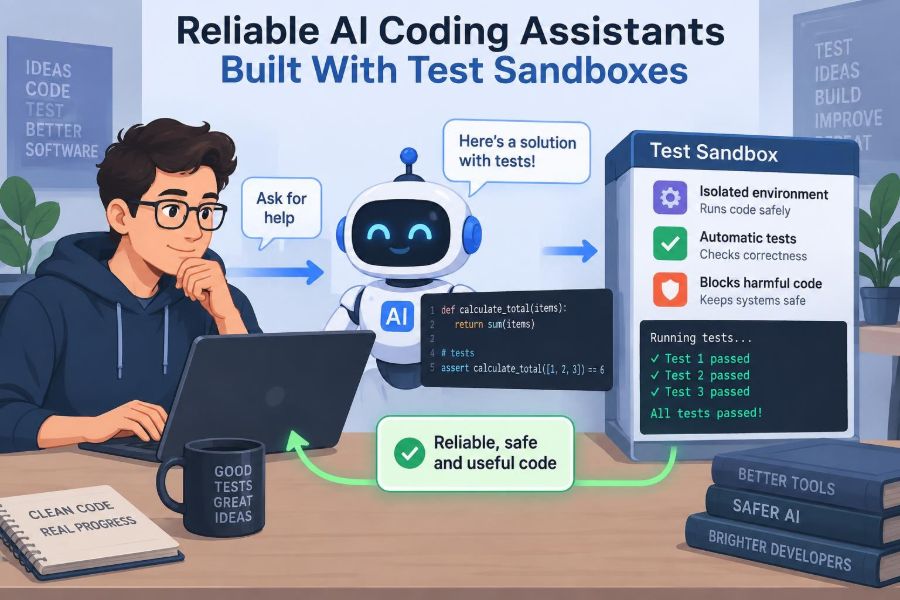

A developer asks an AI coding assistant to repair a failing checkout calculation. The assistant proposes a neat-looking change, explains it confidently, and the revised function appears to work for the example in the prompt.
But one unusual discount combination now produces the wrong total. Or the new code silently breaks an older API. Or it passes a superficial check while introducing an unsafe file operation. In software, code that looks plausible is not necessarily code that is correct.
This is why reliable AI coding assistants need more than a strong language model. They need a controlled way to run code, inspect what happens, compare outcomes with expectations, and try again when the evidence says the first answer was wrong.
Test sandboxes make that feedback loop possible. They turn coding assistance from a one-shot text prediction task into an evidence-guided engineering workflow.
🧩 1. The reliability problem behind AI-generated code
AI coding assistants can draft functions, explain errors, write tests, and suggest refactors. Their output is useful because it recognizes patterns from code and natural-language requests.
Yet an assistant does not automatically know the hidden assumptions of a particular repository. It may misunderstand a requirement, use an unavailable library, or generate code that is syntactically valid but behaviorally wrong.
A reliable system therefore treats generated code as a hypothesis. The sandbox is where that hypothesis meets executable evidence.
🧪 2. What a test sandbox actually is
A test sandbox is an isolated, temporary computing environment for evaluating code. It usually contains a selected runtime, a limited project snapshot, test tools, and tightly controlled permissions.
The assistant can write a proposed patch into this environment and run relevant checks without directly changing a developer’s laptop, production system, or shared main branch.
- It separates experiments from valuable systems.
- It creates repeatable conditions for tests.
- It captures outputs that the assistant and developer can inspect.
🏗️ 3. Isolation is the first design requirement
Isolation means activity inside the sandbox should not freely affect the host machine or external services. Developers commonly use containers, virtual machines, microVMs, or other execution isolation mechanisms.
No isolation method is magical. Its suitability depends on the threat model, such as whether code is merely buggy, potentially malicious, or allowed to process sensitive data.
The central question is simple: if this generated command behaves badly, what can it reach? A good sandbox keeps the answer intentionally small.
🎯 4. Define what “correct” means before testing
Tests cannot establish reliability unless the intended behavior is clear. Before asking an assistant to fix code, developers should identify expected inputs, outputs, errors, side effects, and compatibility constraints.
For a date parser, correctness might include accepted formats, time-zone assumptions, rejection of invalid dates, and preservation of existing callers’ behavior. “Make it work” is too vague to validate.
Clear acceptance criteria also help the assistant choose useful tests instead of optimizing for an unclear goal.
📦 5. Build a minimal, reproducible environment
A useful sandbox includes only what the task needs: the relevant source files, lockfiles, runtime version, test runner, and required fixtures. Smaller environments are easier to understand, faster to create, and less exposed.
Reproducibility matters because a result should not depend on whatever happened to be installed yesterday. Dependency versions, environment variables, and commands should be explicit.
runtime: Python 3.x
install: locked dependencies
test command: pytest tests/test_parser.py
network: disabled
This kind of recipe makes failures easier to investigate and repeat.
🧱 6. Start with the smallest relevant test set
Running every test in a large repository after every edit can be expensive and slow. Developers often begin with tests closest to the changed function or module.
This is not an excuse to ignore broader regressions. It is a staged feedback strategy: get rapid local evidence first, then expand coverage when the patch becomes promising.
- First: focused unit tests.
- Next: nearby integration tests.
- Finally: wider suite, checks, and review gates.
🔍 7. Let the assistant inspect before it edits
Strong workflows ask the assistant to read relevant code, tests, configuration, and documentation before proposing a patch. Existing tests often reveal conventions and edge cases that a short prompt omits.
For example, a function name may suggest it returns a string, while its tests show that it must preserve a custom object type. Repository context reduces these avoidable mistakes.
Developers should still control access carefully: context should be sufficient for the task, not an unrestricted copy of unrelated internal material.
✍️ 8. Make small patches instead of sweeping rewrites
A narrow change is easier to test, review, explain, and revert. An AI assistant may be capable of redesigning a module, but a broad rewrite adds many assumptions at once.
When repairing one bug, developers can ask for the minimum change that satisfies specified tests. If a refactor is genuinely needed, it should be decomposed into independently verifiable steps.
Small diffs make evidence easier to interpret. When ten things change together, a passing test tells less about why it passed.
🧾 9. Treat existing tests as executable specifications
Tests are not perfect descriptions of requirements, but they are valuable evidence of behavior that the codebase already protects. An assistant should read them as part of the contract.
A test can show naming conventions, error messages, serialization formats, mocked dependencies, and intended boundary behavior. It may also expose an outdated assumption that needs human discussion.
Passing old tests alone does not prove a new request is met. It proves the patch has not violated the behavior those tests cover.
🧠 10. Add a test that would have caught the bug
When a defect is reported, one of the most useful steps is to create a focused regression test before implementing the repair. First, that test should fail for the old behavior; then it should pass for the corrected behavior.
This avoids a common trap: changing code until the original symptom disappears without proving the underlying condition was addressed.
A well-named regression test also becomes durable documentation for future maintainers and future assistants.
⚖️ 11. Use several layers of evidence
Different checks catch different failure modes. Unit tests examine small behaviors, integration tests examine component boundaries, and end-to-end tests examine important user flows.
| Check type | Best at finding | Typical limitation |
|---|---|---|
| Unit test | Local logic errors and edge cases | May miss wiring problems |
| Integration test | Incorrect assumptions between components | Can be slower and harder to diagnose |
| Static analysis | Some type, style, and unsafe-pattern issues | Does not prove runtime behavior |
| End-to-end test | Breaks in critical workflows | Usually broad and costly to run |
Reliable assistants are evaluated through a combination of these signals, not a single green checkmark.
🧰 12. Combine execution with static checks
Some mistakes can be detected without running the program. Linters, formatters, type checkers, dependency checks, and language-specific analyzers provide fast feedback about code structure.
An assistant can run these tools in the sandbox after making a patch. If it introduces an unused import, a type mismatch, or a formatting violation, it can correct that issue before presenting the result.
Static checks are useful guardrails, but they complement rather than replace tests with real inputs.
🌐 13. Restrict network access by default
Generated code may attempt to download packages, contact an API, send telemetry, or follow an instruction embedded in untrusted input. Unrestricted network access makes experimentation much riskier and less reproducible.
Many sandbox tasks can run with networking disabled. When a task truly requires external communication, developers can allow a narrowly defined route, use test endpoints, or substitute a local mock service.
Every added connection expands the environment’s trust boundary. 🌐
🔐 14. Protect secrets and sensitive data
Credentials, private keys, customer records, and production tokens should not be casually placed in an AI execution environment. A sandbox is not a reason to lower normal data-handling standards.
Use synthetic fixtures, redacted examples, and scoped test credentials wherever possible. If a secret is indispensable, it should be short-lived, minimally privileged, and unavailable to unrelated commands.
- Do not mount personal credential directories by default.
- Do not copy production databases into routine test runs.
- Do log access decisions without logging the secret itself.
📁 15. Limit files, processes, and permissions
Sandbox policy should specify which directories are readable, which workspace is writable, and whether the generated program may create subprocesses. Resource limits for CPU time, memory, disk space, and process count are also important.
These controls protect infrastructure from accidental infinite loops, fork-like behavior, oversized output, and unwanted file changes. They also make results more predictable.
The assistant needs enough capability to test the task, not unrestricted control of a machine.
🪞 16. Mock external systems rather than touching them
Payments, email providers, cloud storage, databases, and third-party APIs are often inappropriate targets for a sandbox run. Tests should simulate their behavior when practical.
A mock can return a success response, a timeout, malformed data, or a permission error. This lets the assistant exercise application logic without charging cards, sending messages, or mutating real records.
Mocks must be realistic enough to be meaningful. An oversimplified mock can hide the very integration failure a test intends to catch.
🧬 17. Generate edge cases deliberately
Happy-path examples rarely expose the hardest bugs. Good assistants help developers think through empty values, maximum sizes, duplicate requests, malformed input, unusual character encodings, time boundaries, and failure responses.
For numeric code, boundary values and rounding rules deserve special attention. For parsers, partial input and unexpected delimiters are often revealing.
Test generation is most valuable when it is tied to the actual domain, not when it produces a long list of random-looking cases.
🎲 18. Use property-based and fuzz testing when appropriate
Some programs have broad input spaces that are difficult to cover with hand-written examples. Property-based testing generates many inputs and checks general rules, such as whether encoding followed by decoding returns the original value.
Fuzz testing deliberately supplies unusual or malformed inputs to uncover crashes, hangs, and unsafe parsing behavior. A sandbox is a particularly suitable place for these experiments because they may consume resources or trigger failures.
These methods require thoughtful properties and limits. More generated input is not automatically more insight.
🔄 19. Give the assistant a bounded repair loop
The valuable pattern is not “generate code once.” It is inspect, patch, test, read the result, and revise. Each loop converts execution output into feedback for the next proposal.
Bound the loop by time, attempts, and scope. Without limits, an assistant may keep making cosmetic changes, chase unrelated failures, or consume unnecessary compute.
read failure → propose minimal patch → run focused checks
if failing: explain evidence → revise within scope
if passing: run broader checks → prepare summary
When the limit is reached, the system should surface the unresolved evidence to a human rather than pretending success.
📜 20. Capture logs that people can understand
A raw wall of terminal output is difficult to review. A helpful assistant summarizes which commands ran, which files changed, which tests passed or failed, and what remains uncertain.
It should preserve enough detail for reproducibility, including relevant error excerpts and environment information. At the same time, logs must be scrubbed of secrets and sensitive content.
Good reporting makes the assistant’s work auditable instead of mysterious.
🧭 21. Distinguish test failure from infrastructure failure
A failed command does not always mean the patch is wrong. The test environment may have a missing dependency, an expired fixture, an unavailable service mock, or a platform-specific issue.
Assistants should classify evidence carefully. A compilation error caused by their edit differs from a pre-existing failing test; a timeout may require investigation rather than an automatic code rewrite.
This distinction prevents the system from “fixing” application code to compensate for a broken test setup.
🧷 22. Watch for flaky tests
A flaky test passes and fails without a meaningful code change. Common causes include timing assumptions, shared state, random data without a fixed seed, reliance on clock time, and nondeterministic ordering.
AI assistants can accidentally amplify flakiness by adding sleeps or retry loops that hide the real synchronization problem. A better approach is to control time, seed randomness, isolate state, and await explicit conditions.
Trustworthy automation needs deterministic signals whenever possible.
🚦 23. Use confidence as a signal, not a verdict
An assistant may state that a change is likely correct based on passing focused tests, but confidence should reflect the strength and limits of the evidence. It should not be presented as certainty.
For example, a patch may have passed unit tests but not an unavailable integration environment. That is a meaningful qualification for a developer deciding whether to merge.
Evidence-based summaries are better than vague assurances such as “this should work.”
👩💻 24. Keep humans responsible for consequential decisions
Sandboxes improve verification; they do not transfer accountability to a model. Humans still decide the requirement, assess risk, review changes, and approve deployment.
Extra scrutiny is appropriate for authentication, authorization, financial rules, privacy, safety controls, data migrations, and infrastructure changes. In these areas, a passing test suite can still miss an important policy or business constraint.
The assistant can accelerate investigation and implementation, while the developer retains engineering judgment.
🔀 25. Connect sandbox evidence to the delivery pipeline
Once a developer accepts a patch, the same principles continue in version control and continuous integration. A change can trigger automated checks, code review, staging validation, and controlled release procedures.
The sandbox is best understood as an early, isolated stage of a larger quality process. It gives rapid feedback before a proposed edit reaches shared systems.
Teams should avoid treating an assistant’s private successful run as a substitute for the repository’s established checks.
📏 26. Measure the workflow, not just the model
To improve an AI coding assistant, teams can study outcomes such as whether suggested patches compile, whether tests reveal real defects, how often humans revise the changes, and which failures recur.
Qualitative review matters too. Developers may find that an assistant’s summaries are unclear, its tests are shallow, or its patch scope is too large even when checks pass.
These observations improve prompts, tooling, policies, test suites, and the assistant’s access boundaries over time.
🛡️ 27. Design for failure and easy recovery
Every automated execution can fail, so the workflow should make failure safe. Sandboxes should be disposable, changes should be tracked as patches, and commands should have timeouts and resource limits.
If an experiment goes wrong, developers should be able to discard the environment and start from a known clean state. This is safer than letting each attempted repair accumulate hidden changes.
Recovery is not an edge feature; it is part of dependable engineering.
🌟 28. The core principle: generate, verify, then trust proportionally
The central principle is straightforward: an AI coding assistant earns trust through observable, bounded verification, not through fluent explanations. A sandbox supplies the controlled setting where proposed code can be challenged by tests, analyzers, limits, and realistic failure cases.
Reliable development combines a clear specification, minimal changes, layered checks, secure isolation, transparent evidence, and human review. Each layer addresses a different reason generated code might be wrong or unsafe.
The best AI coding assistants do not merely write code; they help developers build evidence that the code deserves to be used. 🧪🛡️💻