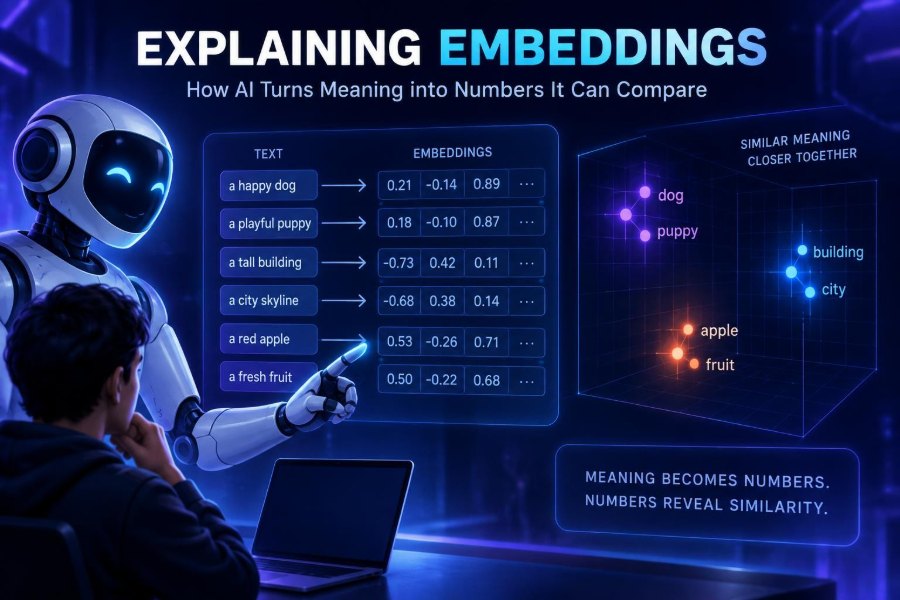

AI systems are becoming less useful when they merely generate text and far more useful when they can find, group, recommend, and reason over the information that matters. That shift depends heavily on embeddings: numerical representations that let software work with meaning rather than only exact words.
Embeddings sit behind semantic search, recommendation engines, retrieval-augmented generation (RAG), duplicate detection, clustering, and many AI assistants. They are also one of the most practical ways to make a language model useful with your own documents without retraining it.
The idea can sound abstract: how can a list of numbers represent a sentence, image, or product? Yet the core intuition is approachable. Things with related meanings are placed near one another in a mathematical space.
After reading, you will be able to explain embeddings clearly, choose a sensible embedding workflow, build a small semantic search prototype, evaluate its results, and avoid common privacy and quality traps.
🧭 1. Start with the plain-English definition
An embedding is a list of numbers, usually called a vector, created by an AI model to represent the meaning or useful features of something. The “something” may be a sentence, document, image, audio clip, product, user, or piece of code.
Instead of treating language as isolated strings, an embedding model maps an input into a point in a high-dimensional space. A vector might contain hundreds or thousands of values, but you rarely need to inspect them individually.
Text:    "reset my forgotten password"
Vector:  [0.014, -0.208, 0.771, ...]
The useful part is not a single number. It is the relationship between whole vectors: semantically related inputs tend to land closer together.
🗺️ 2. Think of meaning as a map
Imagine a map where “puppy” is near “dog,” and “account access” is near “forgot password.” “Volcano” should be much farther away from both. An embedding space is like that map, except it has far more than two dimensions.
Distance is a compact stand-in for similarity. A search query becomes one point; your documents become many points; the system returns nearby points.
- Close vectors: usually related intent, topic, style, or content.
- Distant vectors: usually less related.
- Clusters: groups of items with shared themes.
“Usually” matters. Embeddings encode patterns learned from training data, not a perfect dictionary of truth.
🔢 3. Understand vectors without becoming a mathematician
A vector is an ordered sequence of numbers. In embedding applications, each position is a learned feature, but it is generally not interpretable by humans as “this number means friendliness” or “that number means finance.”
Models learn to arrange vectors through training objectives that reward useful relationships. For example, texts used in similar contexts may be pushed closer together, while unrelated texts are pushed apart.
"How do I change my billing card?"  → vector A
"Update payment method"            → vector B
"Bake a chocolate cake"             → vector C

Similarity(A, B) > Similarity(A, C)
This is why embeddings can match paraphrases even when they share few or no exact keywords.
📐 4. Meet cosine similarity and its cousins
To compare vectors, systems calculate a score. Cosine similarity is common because it compares the angle between vectors, often making it less sensitive to vector length. A higher score usually means greater similarity.
Other choices include dot product and Euclidean distance. The right metric depends on how the embedding model was trained and how your database indexes vectors.
| Method | What it compares | Common use |
|---|---|---|
| Cosine similarity | Angle between vectors | General semantic text retrieval |
| Dot product | Alignment and magnitude | Models designed for dot-product ranking |
| Euclidean distance | Straight-line distance | Some clustering and nearest-neighbor systems |
Do not casually swap metrics. Check the embedding model’s official documentation and keep the model, normalization method, metric, and index configuration aligned.
🧩 5. Separate embeddings from keywords and generation
Keyword search looks for literal terms or carefully configured variants. It is fast, transparent, and excellent for exact identifiers, names, error codes, and filters. Embedding search finds conceptual neighbors.
A generative language model writes or transforms content. An embedding model represents content for comparison. Many modern applications use both: embeddings retrieve evidence, then a generative model answers from that evidence.
| Need | Best first tool | Why |
|---|---|---|
| Find invoice INV-4821 | Keyword or metadata search | Exact string matters |
| Find help for a lost login | Embedding search | Many phrasings express the intent |
| Write a support reply | Generative model | Produces natural language |
| Answer from policy documents | Hybrid retrieval plus generation | Balances recall, precision, and grounded output |
🔎 6. See semantic search in action
Suppose a help center contains an article titled “Recover access to your account.” A customer searches “I can’t sign in after changing phones.” Exact keyword search may miss it; semantic search can rank it highly because the intents are related.
The basic flow has four steps:
- Split and embed every searchable document.
- Store each vector with text and metadata.
- Embed the user’s query using the same model.
- Retrieve the nearest document vectors.
Query: "My verification app is on an old phone"

Likely matches:
1. Recover account access
2. Set up two-factor authentication again
3. Update security settings
The returned text can be shown directly, fed into a RAG prompt, or used to trigger a workflow.
📦 7. Learn the anatomy of an embedding record
A production system should store more than a vector. Keep the original chunk, a stable identifier, source information, timestamps, access controls, and metadata useful for filtering.
{
  "id": "handbook-42-chunk-3",
  "text": "Employees may request equipment through...",
  "embedding": [0.12, -0.04, ...],
  "metadata": {
    "source": "employee-handbook",
    "department": "operations",
    "updated_at": "2025-01-15",
    "access_group": "employees"
  }
}
Metadata turns a broad similarity search into a relevant, safe search. For example, filter to the current policy version and the user’s authorized department before ranking results.
✂️ 8. Chunk documents before embedding them
Long documents often cover multiple ideas. Embedding an entire handbook, transcript, or manual into one vector creates a vague average and makes precise retrieval harder. Chunking splits source content into smaller, meaningful passages.
Start with headings and paragraphs rather than arbitrary character counts. Preserve enough surrounding context to make each chunk understandable on its own, and add a small overlap when adjacent passages depend on one another.
- Keep a heading with the chunk it introduces.
- Avoid splitting tables, code blocks, or sentences in the middle when possible.
- Store parent document IDs so results can be expanded in the interface.
- Test several chunk sizes on real user questions rather than trusting a universal rule.
Chunks that are too large dilute meaning. Chunks that are too small lose context and can produce misleading matches.
🧪 9. Build a tiny semantic search prototype
You can prototype locally with any embedding provider or local embedding model, plus a simple in-memory similarity calculation. The pseudocode below focuses on the architecture rather than a particular vendor library.
documents = [
  "Reset your password from the sign-in page.",
  "Update your billing card in account settings.",
  "Enable two-factor authentication for added security."
]

doc_vectors = embed(documents)
query_vector = embed(["I forgot my login password"])[0]

scores = cosine_similarity(query_vector, doc_vectors)
results = sort_descending(zip(scores, documents))
print(results[:2])
Use the same embedding model for documents and queries. Mixing models usually places vectors in incompatible spaces, so their similarity scores are not meaningful.
🗃️ 10. Choose storage based on scale and operations
For a small prototype, an in-memory array or ordinary database extension may be enough. At larger scale, teams commonly use a vector database, a search platform with vector capabilities, or a relational database with vector indexing.
| Approach | Best for | Watch out for |
|---|---|---|
| In-memory vectors | Learning and small experiments | Limited scale and persistence |
| Relational database with vector support | Apps already centered on relational data | Index tuning and workload contention |
| Search platform with vectors | Hybrid keyword and semantic search | More search configuration |
| Dedicated vector database | Large-scale similarity workloads | Another system to operate and secure |
Compare filtering, hybrid search, permissions, backups, latency, regional availability, observability, and cost using current official documentation. Product capabilities change quickly.
🔀 11. Use hybrid search for better real-world results
Pure vector search is not always best. It can underweight exact product names, legal clauses, model numbers, acronyms, and fresh terminology. Hybrid search combines semantic similarity with keyword relevance and metadata filters.
A practical ranking strategy is: apply permissions and hard filters first, retrieve candidates with both keyword and vector search, then merge or rerank them.
Search request: "OAuth error 401 in the mobile SDK"

Hard filters: product = mobile-sdk, user_can_access = true
Keyword signal: exact match for "401" and "OAuth"
Vector signal: semantic match for authentication failure
Final ranking: combined signals, then optional reranker
Hybrid retrieval is often the safer default for support, enterprise knowledge, code search, and catalogs.
🧠 12. Connect embeddings to RAG
Retrieval-augmented generation gives a language model relevant external context before it answers. Embeddings are frequently the retrieval layer: they identify passages likely to answer the user’s question.
A basic RAG pipeline embeds the query, retrieves relevant chunks, places those chunks into a model prompt, and asks the model to answer only from the supplied context. The model should also be allowed to say when the context is insufficient.
You are a support assistant. Answer only from the context below.
If the context does not answer the question, say so clearly.

Context:
[retrieved passage 1]
[retrieved passage 2]

Question: How do I transfer my authenticator app?
Retrieval improves grounding, but it does not guarantee correctness. Bad chunks, outdated sources, or poor rankings can still yield a confident wrong answer.
🧷 13. Add metadata, permissions, and freshness
Similarity alone does not know who is allowed to see a document. A vector database must not become a side door around your existing authorization rules. Enforce access constraints during retrieval, not after sensitive text has already been sent to a model.
- Attach tenant, role, project, and classification metadata to every chunk.
- Filter by authorization before or within vector retrieval.
- Delete or re-embed content when its source is removed or changed.
- Prefer current documents when older policies conflict.
- Log retrieval IDs and scores without logging unnecessary sensitive query text.
For compliance-heavy workflows, involve security and legal teams early. An embedding is not automatically harmless simply because it is numerical.
📏 14. Evaluate retrieval before celebrating the demo
A demo can look magical with one hand-picked query. Evaluation asks whether the system reliably retrieves the right information for representative questions, languages, user roles, and edge cases.
Create a small test set of real or carefully anonymized queries. For each, label the documents or chunks that should be retrieved. Then measure whether a relevant result appears in the top few positions.
- Recall: did retrieval find the needed evidence?
- Precision: are top results actually relevant?
- Latency: is the experience fast enough?
- Answer quality: does a downstream assistant use the evidence faithfully?
Review failures by category: poor chunking, missing documents, ambiguous queries, bad filters, stale data, or a model mismatch. Fixing the data pipeline often matters more than changing models.
🧰 15. Improve results with query rewriting and reranking
A query can be short, vague, misspelled, or framed as a story. A controlled query-rewriting step can turn “my code doesn’t work” into a clearer search query using information the user already supplied. Do not invent details during rewriting.
A reranker is another model or scoring stage that examines the query and a smaller set of retrieved candidates more closely. It can reorder broad vector-search results for higher precision.
Step 1: retrieve top 30 candidates with hybrid search
Step 2: rerank those candidates against the original query
Step 3: send the best 3 to 8 passages to the answer model
Step 4: cite titles or source labels in the interface
Reranking adds latency and cost, so compare it against a baseline. It is most valuable when many candidate passages sound superficially similar.
🎨 16. Know that embeddings are not only for text
Image embeddings can support visual search: upload a chair photo and find similar products. Audio embeddings can help group recordings or locate similar sounds. Code embeddings can find related functions, APIs, or implementation patterns.
Some systems use multimodal embeddings, mapping text and images into a shared space. Then a text query such as “minimal purple running shoes” can retrieve relevant images.
The same operational principles apply: use appropriate models, evaluate on your domain, preserve permissions, and remember that “similar” can mean different things. A visual model may prioritize color and shape when your business needs compatibility or safety certification.
⚠️ 17. Avoid the most common embedding mistakes
Most disappointing embedding projects fail through pipeline decisions, not because vector math is inherently weak. Watch for these recurring errors.
- Embedding whole documents: split them into coherent chunks.
- Using different models for queries and documents: keep spaces compatible.
- Ignoring exact search: use hybrid retrieval for identifiers and names.
- Skipping filters: metadata and access control are core features.
- Trusting scores as universal truth: a score threshold from one model may not transfer to another.
- Never reindexing: source content and embedding models both evolve.
- Testing only easy queries: include ambiguity, jargon, typos, and no-answer cases.
Also avoid presenting retrieval as reasoning. A nearby vector is a useful candidate, not proof that a document answers the question.
🔒 18. Handle privacy and responsible use deliberately
Embedding input can contain personal, confidential, or regulated information. Depending on the model and provider, sending content for embedding may create retention, residency, contractual, or access-control obligations. Verify current terms and technical controls with the official source and your organization’s policies.
Embeddings can retain information about their input in ways that are not intuitive, and they can expose sensitive associations when combined with weak access controls. Minimize data, redact unnecessary identifiers, encrypt data in transit and at rest, and scope retrieval tightly.
Bias also matters. Semantic similarity may reflect cultural assumptions, uneven language coverage, or stereotypes in training data. Test with diverse phrasing and affected users, especially when results influence hiring, moderation, healthcare, finance, or other high-impact decisions.
🚀 19. Follow this practical implementation path
Start narrow. Choose one information source and one user task, such as finding internal onboarding answers or matching support tickets to help articles. Define success before selecting infrastructure.
- Collect clean, authorized source content.
- Chunk it by semantic structure and attach useful metadata.
- Generate embeddings and store vectors plus source text.
- Build hybrid retrieval with permission-aware filters.
- Create a labeled evaluation set from realistic questions.
- Inspect results, adjust chunks and ranking, then retest.
- Add generation only if users need synthesized answers.
- Monitor freshness, failures, latency, and access behavior.
This sequence prevents a common trap: building an impressive chatbot interface before proving that retrieval is dependable.
✅ 20. Use this quick-start checklist
- Define one retrieval problem with a measurable outcome.
- Use embeddings to represent meaning, not as a replacement for all search.
- Embed document chunks and user queries with compatible models.
- Store original text, source IDs, metadata, and authorization fields beside vectors.
- Start with hybrid keyword plus vector search.
- Evaluate with real questions and inspect the retrieved passages.
- Plan for updates, deletions, reindexing, and permission changes.
- Protect sensitive inputs and test for biased or unsafe behavior.
Embeddings turn similarity into a practical building block: use them to retrieve better context, then design the surrounding data, evaluation, and safety systems with equal care. 🤖📐🚀