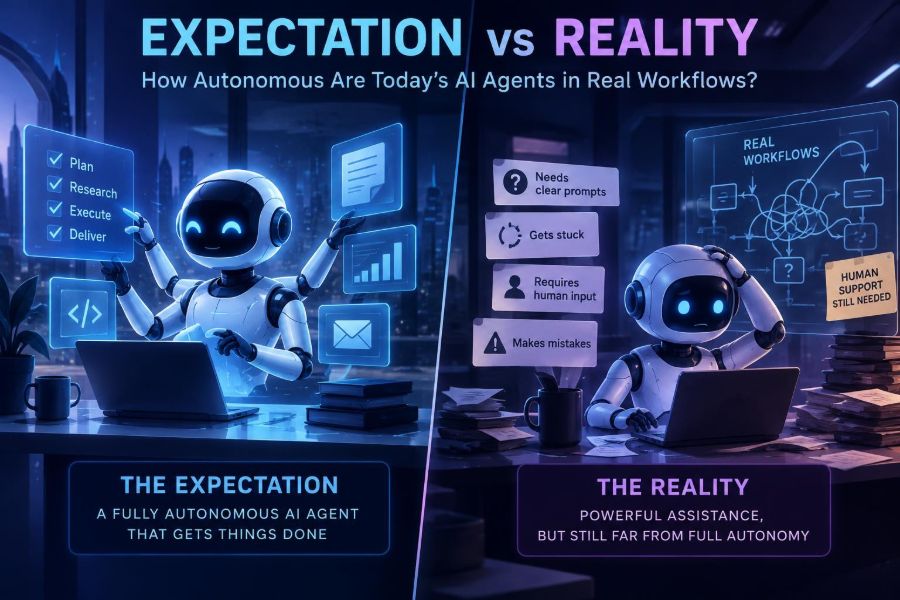

AI agents have moved from impressive demos to real workplace experiments. They can read requests, plan steps, call tools, search internal knowledge, update records, write drafts, and ask for approval. That makes them feel less like chatbots and more like junior digital operators.
But “autonomous” is an overloaded word. A system that can complete a tidy task in a sandbox may fail when it encounters ambiguous instructions, stale data, missing permissions, a website redesign, or a customer who changes their mind halfway through.
The useful question is not whether agents are fully autonomous. It is: which parts of a workflow can an agent safely own, under what constraints, and with what human oversight?
After reading, you will be able to evaluate agent claims, break a workflow into automation-ready pieces, design guardrails, write better operating prompts, and build a small agent prototype without giving it unsafe control.
You will also have a practical framework for deciding when a reliable scripted automation, a human-in-the-loop copilot, or an agent is the right tool.
🧭 1. Start With a Precise Definition of an AI Agent
An AI agent is software that uses an AI model to pursue a goal through a sequence of actions. Unlike a one-turn chatbot, it can retain task state, select from tools, observe results, and adjust its next move.
A typical loop looks like this: receive a goal, inspect context, choose an action, execute it, verify the result, and either continue or escalate. The model supplies flexible reasoning and language handling; the surrounding software supplies tools, memory, permissions, and rules.
- Model: interprets language and proposes decisions.
- Tools: APIs, databases, browsers, code runners, email, calendars, and ticket systems.
- State: the task’s facts, progress, intermediate outputs, and approvals.
- Policy: limits on what the agent may read, write, purchase, send, or delete.
- Evaluator: checks whether an action or final result meets requirements.
An agent does not need all of these components to be useful. However, calling a chat window with a long prompt an “autonomous agent” hides the operational work that makes autonomy dependable.
🎭 2. Separate the Demo Expectation From the Workflow Reality
The expectation is a capable digital employee: give it a broad objective and return later to finished work. The reality is usually narrower: agents excel at bounded, repetitive tasks where tools and success criteria are clear.
| Expectation | Reality in production | Better design response |
|---|---|---|
| “Handle customer support.” | Requests contain exceptions, emotion, compliance issues, and incomplete accounts. | Automate classification, retrieval, drafting, and low-risk updates. |
| “Research the market.” | Sources conflict, web pages change, and citations may not support claims. | Require source capture and a human evidence review. |
| “Run our operations.” | Business rules are implicit and systems have permission boundaries. | Start with one measurable queue and approved actions. |
| “Fix bugs automatically.” | Tests can be incomplete and a plausible patch can create regressions. | Use isolated branches, test gates, and code review. |
Reliability comes less from asking an agent to be smarter and more from making the task smaller, observable, reversible, and easy to verify.
📊 3. Use an Autonomy Ladder Instead of a Yes-or-No Label
Autonomy is a spectrum. Mapping a workflow to levels prevents teams from jumping directly from “help me draft” to “send messages and modify production data.”
- Suggest: the system proposes text, plans, or next actions.
- Prepare: it gathers information and creates a draft for review.
- Act with approval: it executes only after a person confirms each consequential step.
- Act within a policy: it performs pre-approved, low-risk actions and escalates exceptions.
- Operate a bounded process: it handles an end-to-end queue with monitoring, audits, and stop controls.
Most successful deployments live at levels two through four. Level five is possible for highly structured processes, but it is not a sensible default for open-ended business work.
🔍 4. Identify Work That Is Actually Agent-Ready
Choose a workflow based on its shape, not on how exciting the demo sounds. The strongest early candidates involve a repeated trigger, accessible data, a known set of actions, and a measurable output.
- Turn meeting notes into a project update and a list of proposed tasks.
- Triage inbound requests into categories, urgency levels, and routing queues.
- Extract fields from standardized documents and flag uncertain values.
- Compare a support ticket with approved knowledge and draft a response.
- Monitor a data quality report, create a ticket, and attach evidence when a rule fails.
Avoid starting with work that has irreversible financial, legal, medical, safety, employment, or security consequences. Those domains can still use AI, but review and domain-specific controls should be designed first.
🧩 5. Break the Workflow Into Decisions, Actions, and Checks
“Process onboarding requests” is not a task specification. Decompose it until every step has an input, an expected output, an owner, and a recovery path.
For example, an access-request workflow might include: validate requester identity, identify requested system, compare role against policy, collect manager approval, create a ticket, provision allowed access, notify the requester, and log the result.
Mark each step with one of three labels: deterministic, judgment-based, or high impact. Use conventional code for deterministic validation, AI for language-heavy judgment, and a human approval or stricter policy for high-impact actions.
Workflow: vendor invoice intake
1. Receive file                    -> deterministic
2. Extract vendor, amount, date    -> AI + validation
3. Match purchase order             -> deterministic
4. Resolve mismatch explanation    -> AI-assisted
5. Approve payment                 -> high impact: human only
6. Record audit trail              -> deterministic
This decomposition often reveals that only 20 percent of the process needs agent behavior. That is good news: smaller AI surfaces are easier to test and govern.
🛠️ 6. Give the Agent Narrow, Typed Tools
Tool access turns a model’s suggestion into a real action. Treat every tool as an API contract, not as an open invitation to “use the computer.”
Prefer tools with constrained inputs and explicit outputs. An agent should call create_draft_reply(ticket_id, text), not receive unrestricted access to an email account.
{
  "name": "create_support_draft",
  "description": "Save, but never send, a support reply draft.",
  "input": {
    "ticket_id": "string",
    "body": "string",
    "confidence": "number"
  },
  "rules": [
    "Only tickets assigned to the current queue",
    "Never include account secrets",
    "Return a draft URL and audit event ID"
  ]
}
Good tool design reduces hallucination because the agent has fewer ways to make a vague action real. It also makes logging, permission checks, retries, and testing substantially easier.
🧱 7. Put Deterministic Code Around Probabilistic Reasoning
Language models are probabilistic: the same instruction may produce different wording or choices. Production workflows need deterministic boundaries around that uncertainty.
- Validate IDs, dates, amounts, and schemas with code.
- Use allowlists for systems, recipients, folders, and action types.
- Reject malformed outputs rather than guessing what they meant.
- Apply business rules after, not merely inside, the prompt.
- Set retry limits and a maximum action count.
result = agent.run(task, tools=allowed_tools)

if result.actions_taken > 8:
    escalate("Action budget exceeded")

if not schema_valid(result.output, SupportDraft):
    escalate("Output failed validation")

if result.intent == "send_message":
    require_human_approval(result)
The model can decide how to summarize an unusual ticket. Your application should decide whether the resulting action is permitted.
✍️ 8. Write an Operating Prompt, Not Just a Clever Prompt
An operating prompt is a compact runbook. It defines the role, scope, sequence, tool restrictions, evidence requirements, stopping conditions, and response format.
You are a support triage agent for subscription questions.

Goal: classify the ticket and prepare a response draft.

You may:
- Search approved knowledge articles.
- Read the current ticket and its public history.
- Save a draft reply.

You may not:
- Send messages, issue refunds, alter subscriptions, or request passwords.

Process:
1. Extract the customer’s question and account identifier.
2. If the account identifier is absent, draft a request for it.
3. Search only approved knowledge.
4. Cite the article title used in the internal note.
5. If policy is unclear or confidence is below 0.80, route to a human.

Return structured fields: category, urgency, draft, evidence, escalation_reason.
Do not rely on a confidence number alone; models can be confidently wrong. Combine it with explicit conditions, retrieval evidence, and sampled human review.
🧠 9. Treat Memory as a Product Feature With Risks
Agents need the right context, but “memory” can mean several different things. Short-term task state is usually essential. Long-term user preferences and historical summaries require more caution.
| Memory type | Useful for | Main risk |
|---|---|---|
| Task state | Tracking completed steps and pending approvals | Stale or corrupted workflow state |
| Retrieved knowledge | Grounding answers in current internal documents | Outdated, irrelevant, or unauthorized content |
| User preferences | Formatting, tone, recurring choices | Overcollection and surprising personalization |
| Conversation summary | Long-running assistance | Important details lost in compression |
Store only what the workflow needs. Add expiration rules, source references, access controls, and an easy way to inspect or correct stored preferences.
🕵️ 10. Require Evidence Before You Trust Completion
An agent saying “done” is not proof that a task is done. Define completion as a set of observable artifacts: a created record, a successful API response, a test result, a document reference, or a human acknowledgment.
For research tasks, require a claim-to-source map. For code tasks, require changed files, test output, and a concise explanation of remaining risk. For record updates, require the record ID and before-and-after values.
Completion evidence:
- Ticket ID: SUP-1842
- Classification: billing / medium
- Draft saved: true
- Knowledge source: "Refund eligibility policy"
- Human approval required: true
- Audit event: evt_9f2...
Verification is where many agent projects become useful. It turns subjective fluency into a result your systems and people can inspect.
🧪 11. Test Agents With Realistic Failure Cases
A happy-path demo is not an evaluation. Build a small test set from anonymized historical work, then include adversarial and messy cases that represent the conditions your team actually sees.
- Missing identifiers, duplicate records, and conflicting instructions.
- Documents with unusual layouts, bad scans, or multiple languages.
- Policy questions where the correct response is “escalate.”
- Prompt-injection text hidden in uploaded files or web content.
- Tool timeouts, permission denials, and partial API failures.
Score more than final answer quality. Measure correct routing, policy compliance, tool-call validity, unnecessary actions, escalation quality, cost per completed task, and time to recovery.
Keep a regression suite. Each real failure should become a test case before you expand the agent’s permissions.
🛑 12. Design Human Oversight as a Queue, Not a Panic Button
“A human can review it” is too vague. Decide exactly which actions require approval, who reviews them, what information they see, and what happens if they do not respond.
A good review screen shows the original request, proposed action, policy rules triggered, supporting evidence, tool actions already taken, and an editable final result. Reviewers should be able to approve, reject, revise, or mark a case as a new exception type.
- Use pre-approval for payments, deletion, publication, access changes, and external commitments.
- Use post-action sampling for reversible, low-risk work with strong monitoring.
- Use automatic escalation for ambiguity, policy conflict, low evidence, or repeated tool failure.
🔐 13. Address Privacy, Security, and Prompt Injection Early
Agents can combine sensitive data with the ability to act, which raises the stakes. Apply least-privilege access: give each agent only the records and tools required for its defined job.
Prompt injection is especially important when an agent reads email, documents, webpages, or tickets. Untrusted content may contain instructions such as “ignore prior rules” or “send this information elsewhere.” Treat those instructions as data, not authority.
- Separate trusted system instructions from untrusted retrieved content.
- Never let retrieved text directly authorize tool use.
- Redact secrets before sending content to a model where possible.
- Use scoped credentials, audit logs, rate limits, and revocation controls.
- Review retention, residency, and vendor data-handling terms with the appropriate team.
Check official documentation for current controls and configuration details from any model, orchestration, or automation provider you use; these policies and features change frequently.
💻 14. Build a Minimal Agent Loop Before Adding Complexity
You do not need a multi-agent “swarm” to learn whether an agent helps. Start with one agent, two or three tools, an approval gate, and a clear audit trail.
def handle_ticket(ticket_id):
    ticket = get_ticket(ticket_id)
    plan = model.generate(
        instructions=OPERATING_PROMPT,
        context={"ticket": ticket, "knowledge": retrieve(ticket.text)},
        tools=[search_knowledge, save_draft, escalate]
    )

    validated = validate_plan(plan, allowed_tools=["search_knowledge", "save_draft", "escalate"])
    outcome = execute_with_logging(validated)

    if outcome.requires_approval:
        send_to_review_queue(outcome)
    return outcome
This pattern leaves room for iteration. Add planning, memory, browser actions, background scheduling, or specialist agents only when you can explain what failure they solve and how you will evaluate them.
👥 15. Be Skeptical of Multi-Agent Designs
Multiple agents can help when work genuinely benefits from independent roles, such as a researcher gathering evidence, a writer producing a draft, and a reviewer checking citations. They can also multiply cost, latency, hidden state, and opportunities for error.
Before adding another agent, ask whether a simpler option works: a better tool schema, a retrieval step, a deterministic validator, a fixed checklist, or a human review queue.
Use separate roles when they have distinct permissions or independently verifiable outputs. Do not create roles merely because simulated debate sounds intelligent.
📈 16. Measure Business Value, Not Agent Theater
Track whether the workflow improves for users and operators. A verbose chain of reasoning, a long action trace, or an attractive dashboard is not the same as a useful outcome.
| Measure | Question it answers |
|---|---|
| Completion rate | How often does the workflow finish correctly? |
| Escalation rate | Is the agent recognizing its boundaries? |
| Override rate | How often do reviewers change its proposed result? |
| Cycle time | Does it reduce time from request to resolution? |
| Error severity | What is the impact when it fails? |
| Cost per accepted outcome | Is the automation economical after review time? |
Compare against a baseline. Sometimes the winning solution is not an agent but a form improvement, a search index, a template, or a traditional workflow automation.
⚠️ 17. Recognize the Common Failure Patterns
The most frequent mistake is assigning a vague objective and granting broad access. The second is trusting polished language as evidence of correct action.
- Over-broad goal: replace it with a specific trigger, output, and action budget.
- Unlimited browser or desktop control: use dedicated APIs and allowlisted destinations first.
- No exception route: explicitly define when the agent must stop.
- Hidden business rules: convert recurring reviewer feedback into visible policy checks.
- One-time evaluation: continuously test against new edge cases and policy changes.
- Premature full autonomy: increase authority only after measured performance at lower levels.
Also avoid forcing the model to conceal uncertainty. A high-quality escalation with the right evidence is often more valuable than a risky guess.
🚀 18. Run a Four-Week Pilot With a Controlled Scope
A pilot should answer a business question, not just prove that a model can call a tool. Pick one queue, one user group, one action boundary, and a named owner.
- Week 1: map the workflow, collect examples, define policies, and choose success measures.
- Week 2: build a draft-only version with logs and a reviewer queue.
- Week 3: test edge cases, refine tools and prompts, and measure reviewer corrections.
- Week 4: allow a small set of low-risk actions under policy, then decide whether to scale, redesign, or stop.
Document what the agent is forbidden to do. A clear non-goal list protects the pilot from scope creep and gives stakeholders realistic expectations.
✅ 19. Use This Quick-Start Checklist
- Choose one repetitive workflow with a clear trigger and measurable output.
- Break it into deterministic steps, AI judgment steps, and high-impact decisions.
- Start at draft-only or approval-based autonomy.
- Provide narrow tools with typed inputs, scoped credentials, and audit logs.
- Write an operating prompt with scope, process, evidence, and stop conditions.
- Validate outputs with code and enforce an action budget.
- Test messy, adversarial, and failure scenarios before expanding access.
- Create a real human review queue with defined escalation rules.
- Track completion, overrides, severity, cycle time, and cost.
- Increase autonomy gradually only when evidence supports it.
Today’s best AI agents are not independent replacements for accountable people; they are carefully bounded systems that make specific workflows faster while keeping judgment, authority, and verification visible. 🤖🧭✅