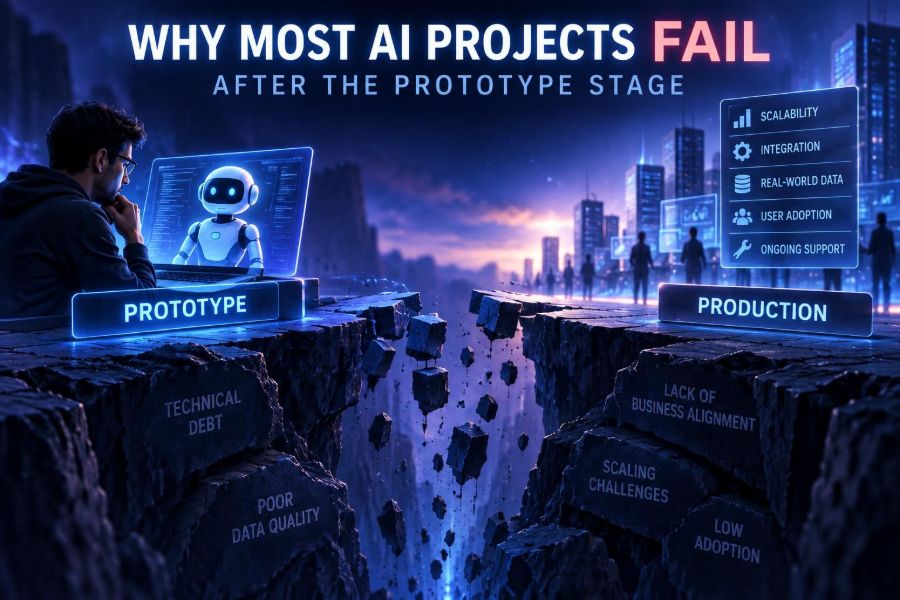

AI prototypes are easier than ever to build. A team can connect a model to a document folder, produce an impressive demo in an afternoon, and convince everyone that a major workflow is about to change.
Then the prototype meets the real world: unclear ownership, messy data, unpredictable outputs, security review, user skepticism, cost surprises, and systems that were never designed to work together. The demo succeeds, but the project stalls.
This matters now because organizations are moving from isolated experiments to AI embedded in customer experiences, internal operations, developer tools, and creative workflows. The gap between a clever proof of concept and a dependable product is where most of the value is either created or lost.
After reading, you will be able to diagnose why an AI initiative is stuck, design a path from prototype to production, measure whether it is genuinely useful, and make practical technical and organizational decisions before failure becomes expensive.
🧪 1. Understand the Prototype-to-Production Gap
A prototype answers one narrow question: can this model produce a plausible result? A production system must answer a much larger set: can it do so safely, consistently, affordably, quickly, and usefully for the right people?
The prototype is usually built around hand-picked examples, a patient builder, and a forgiving audience. Production receives ambiguous requests, incomplete data, malicious inputs, concurrent users, and people who need to finish work on a deadline.
| Prototype concern | Production concern |
|---|---|
| Does it generate a good answer? | How often is the answer good enough for this decision? |
| Can it access a few documents? | Does it enforce permissions across all current documents? |
| Does one request work? | Can it serve real traffic within latency and cost limits? |
| Does the team like the demo? | Do users change behavior and achieve a measurable outcome? |
| Can an engineer repair it? | Can an operator detect, explain, and recover from failure? |
The mistake is not making prototypes. They are essential for learning. The mistake is treating prototype evidence as production evidence.
🎯 2. Start With a Decision, Not a Model
Many projects begin with, “Where can we use AI?” That framing creates a technology search rather than a business or user solution. Begin with a decision, task, or bottleneck that is currently expensive, slow, inconsistent, or difficult to scale.
Write a one-page problem statement before selecting a model or building a prompt. Keep it specific enough that someone can tell whether the work helped.
Problem: Support agents spend too long locating policy details in approved documents.
User: Internal support agent handling a live customer case.
Trigger: Agent opens a case involving a policy question.
AI task: Retrieve relevant approved passages and draft a cited answer.
Human decision: Agent verifies, edits, and sends the final response.
Success: Lower research time without increasing incorrect guidance.
Non-goal: Fully autonomous customer replies.
This simple exercise exposes a critical design choice: is AI generating content, retrieving information, classifying work, extracting fields, recommending an action, or acting through a tool? Each requires different controls.
📏 3. Define Success Before You Build
“The output looks impressive” is not a success metric. It is an invitation to endless debate. Define quality, operational, and adoption metrics before the first pilot.
- Quality: accuracy, groundedness, completeness, edit rate, or reviewer acceptance.
- Operational: response time, failure rate, cost per completed task, and escalation rate.
- Business: resolution time, conversion, rework, revenue protected, or risk reduced.
- Adoption: eligible users who return, tasks completed with the tool, and voluntary versus forced usage.
Set a baseline from the current process. If researchers take 12 minutes to find an answer today, a new system cannot claim productivity gains without comparing against that number.
Also define a stop condition. For example: pause rollout if high-severity unsupported claims exceed an agreed threshold during review. A team that defines failure in advance can learn quickly rather than defend a weak solution.
🧭 4. Choose the Right Level of Autonomy
Autonomy is not a badge of sophistication. It is a risk and workflow decision. The best early production systems often assist a person rather than replace one.
| Pattern | Best fit | Main control |
|---|---|---|
| Drafting assistant | Writing, summarization, analysis | Human edits before use |
| Recommendation | Prioritization and routing | Human approval or sampling |
| Extraction | Forms, documents, structured records | Schema validation and confidence review |
| Tool-using agent | Repeatable low-risk actions | Permission boundaries and approval gates |
| Autonomous workflow | Reversible, well-measured processes | Monitoring, rollback, exception handling |
Ask three questions: What is the cost of a wrong action? Is the action reversible? Who is accountable? If the answers reveal high stakes, require review and limit what the system can do.
🗂️ 5. Treat Data as a Product, Not a Folder
AI systems fail when they are fed outdated, contradictory, unowned, or inaccessible information. Retrieval does not magically repair poor knowledge management; it can make confusion easier to retrieve.
For a knowledge-based application, inventory the source material and assign an owner to each collection. Decide which sources are authoritative when they disagree, how often content is refreshed, and what happens when access is revoked.
- List the documents, databases, APIs, and records the system needs.
- Classify them by sensitivity, owner, freshness, and authority.
- Remove duplicates, obsolete files, and unclear drafts.
- Preserve metadata such as department, effective date, region, and access role.
- Test retrieval with realistic user questions, not only document titles.
A useful rule: if a human cannot identify the source of truth, an AI system should not be expected to do it reliably.
🔎 6. Build Retrieval That Can Show Its Work
When an application needs current organizational knowledge, use retrieval to provide relevant source material at request time rather than relying on a model to remember it. This approach is often called retrieval-augmented generation, but the name matters less than the behavior.
Good retrieval requires more than splitting documents and searching for similar text. It needs sensible chunks, metadata filters, access-aware search, reranking where appropriate, and source citations in the response.
System instruction:
Answer only from the supplied approved sources.
If the sources do not support an answer, say what is missing.
Cite each factual claim using the supplied source ID.
Do not infer policy details beyond the text.

User question: Can a customer change the delivery address after dispatch?

Retrieved sources:
[POL-17, effective 2025-01-01] ...
[OPS-04, effective 2024-11-01] ...
Test a difficult set of questions: wording variants, questions with no answer, conflicting documents, permission-restricted content, and requests that combine unrelated topics. These are more revealing than easy matches.
🧱 7. Design Prompts as Interfaces
A prompt is not magic prose. In production, it is an interface specification between your application and a probabilistic system. It should state the task, available context, constraints, output format, and behavior when information is insufficient.
Use clear delimiters and request structured output when software must consume the answer. Avoid asking a model to quietly guess missing facts.
Role: You extract invoice fields for a review workflow.

Rules:
- Return only the requested fields.
- Use null when a field is absent or unreadable.
- Do not calculate tax or invent values.
- Put uncertainty in review_notes.

Output format:
{
  "vendor": "string or null",
  "invoice_number": "string or null",
  "total": "number or null",
  "currency": "string or null",
  "review_notes": ["string"]
}
Version prompts in source control. A small wording change can alter output quality, formatting, cost, and safety behavior, so treat prompt edits like code changes.
✅ 8. Create an Evaluation Set Before Scaling
Teams often test AI by typing a few examples into a chat interface. That is useful exploration, not evaluation. Build a representative set of real tasks with expected outcomes or reviewer criteria.
Your evaluation set should include ordinary cases, edge cases, failures from the existing process, adversarial or confusing inputs, and examples from every important user segment. Remove or protect sensitive data as needed.
- For extraction, compare fields with verified records.
- For classification, measure agreement with labeled examples and inspect costly errors.
- For retrieval, check whether the right source appears near the top.
- For generation, use a rubric for factual support, completeness, tone, and usefulness.
Keep the set stable enough to compare changes, but add newly discovered failures continuously. This becomes your regression suite.
🧑⚖️ 9. Use Human Review Intentionally
“Human in the loop” can be a real safeguard or a vague excuse. Review works only when the reviewer knows what to check, has enough time, and can reject or correct the result without friction.
Match review intensity to impact. A marketing draft may need author approval. A financial, legal, medical, employment, or safety-related output may require specialist review and strict limits on what the system is allowed to conclude.
Show reviewers the evidence, not merely the answer. For a retrieval system, surface source excerpts and dates. For classification, show relevant signals. For an agent action, show the intended action, affected records, and consequences before approval.
🔐 10. Engineer Privacy and Security From Day One
Sending data to an AI service is still data processing. A project can be technically impressive and still fail review because it has no answer to basic questions about data handling, identity, access, retention, and vendor controls.
- Minimize data: send only fields needed for the task.
- Apply role-based access before retrieval, not after generation.
- Keep secrets out of prompts, logs, screenshots, and test fixtures.
- Redact or tokenize sensitive identifiers where practical.
- Record who accessed what and which action the system took.
- Review provider documentation and your organization’s policies for current terms and capabilities.
Prompt injection deserves special attention. Untrusted text may instruct the model to ignore rules, reveal hidden data, or take unsafe actions. Treat retrieved documents, emails, web pages, and user messages as untrusted input, not as trusted instructions.
Security boundary:
1. System policy defines allowed behavior.
2. User request defines the requested task.
3. Retrieved content is evidence only.
4. Tool calls require an allowlist and validated arguments.
5. High-impact actions require explicit approval.
🛠️ 11. Constrain Tool-Using Agents
An agent that can call APIs, modify records, send messages, or purchase services can create value quickly. It can also turn a misleading instruction into a real-world error. Give agents the smallest set of permissions necessary.
Do not expose a general database query tool or unrestricted shell to an agent simply because it makes the demo more flexible. Wrap operations in narrow tools with validated inputs and predictable outputs.
def create_refund(order_id, amount, reason):
    if not is_valid_order_id(order_id):
        raise ValueError("Invalid order")
    if amount <= 0 or amount > 50:
        raise ValueError("Amount requires approval")
    if reason not in ALLOWED_REASONS:
        raise ValueError("Unsupported reason")
    return submit_refund(order_id, amount, reason)
Use dry-run mode first. Let the system propose actions, then compare proposed and approved actions. Add idempotency, audit logs, rate limits, and a clear kill switch before broader rollout.
📊 12. Monitor the System, Not Just the Model
Production quality changes as users, documents, prompts, integrations, and model providers change. Monitoring only uptime misses the reasons users lose trust.
Log enough context to investigate a failure while respecting privacy rules. Useful signals include request category, retrieval sources, output schema validity, tool attempts, latency, token or compute usage, reviewer corrections, and user feedback.
- Leading signals: low source coverage, format failures, rising retries, unusual tool requests.
- Quality signals: sampled reviewer scores, citation support, correction rate, escalation rate.
- Business signals: task completion, handling time, abandoned workflows, repeat usage.
Create alerts for system breakage and scheduled reviews for quality drift. Not every decline creates an error message.
💸 13. Make Cost and Latency Product Requirements
A prototype often hides its economics because it handles a handful of requests. At scale, long contexts, repeated retries, complex agent loops, and premium model calls can make a useful feature unaffordable or too slow.
Estimate cost per completed task, not merely cost per request. Include retrieval, model calls, retries, human review, storage, observability, and support. A cheaper response that creates more rework may cost more overall.
Practical optimization order:
- Remove unnecessary context and duplicate calls.
- Cache safe, reusable results where freshness permits.
- Route simpler tasks to simpler methods or models.
- Use structured workflows instead of open-ended loops.
- Set timeouts, maximum steps, and budget limits.
Speed is also a trust feature. If an assistant interrupts a live workflow with a long wait, users return to their old process.
🔌 14. Integrate Into the Real Workflow
Users rarely adopt AI because it is available in a separate chat window. They adopt it when it removes a meaningful step inside the place where work already happens.
Map the workflow from trigger to outcome. Identify the systems of record, handoffs, approvals, exceptions, and final owner. Then decide where AI provides the smallest useful intervention.
For example, a support assistant may work better as a cited suggestion panel inside a case screen than as a standalone chatbot. The agent already has customer context, must verify the answer, and needs a simple way to insert an edited response.
👥 15. Design for Trust, Training, and Change
AI adoption is a change-management problem as much as a model problem. People may worry about surveillance, job loss, bad advice, loss of craft, or being blamed for machine errors. Ignoring those concerns creates quiet resistance.
Explain what the system does, what it does not do, what data it uses, and who remains accountable. Train users with examples of good use, bad use, and escalation paths.
- Invite frontline users into testing before launch.
- Give users a fast way to report bad outputs.
- Publish a short usage guide beside the feature.
- Measure whether the tool adds hidden review work.
- Celebrate useful corrections as product feedback, not user failure.
A transparent limitation can increase trust more than an overconfident promise.
🏗️ 16. Assign Durable Ownership
Projects often die after the prototype because no team owns the unglamorous work: refreshing data, reviewing errors, handling incidents, updating prompts, paying for usage, and answering user questions.
Name an accountable product owner, technical owner, data owner, security partner, and business sponsor. One person can hold multiple roles in a small team, but the responsibilities should be explicit.
Define an operating rhythm: weekly error review during pilots, regular evaluation runs after changes, a data refresh schedule, and a process for approving new tools or expanded autonomy.
🚦 17. Roll Out in Stages
A staged rollout limits harm and produces better evidence. Start with a narrow workflow, a defined user group, and an easy rollback path. Resist the temptation to announce a broad transformation before you have operational proof.
- Discovery: confirm the problem, baseline, data, and risk level.
- Prototype: test whether the core interaction is technically plausible.
- Pilot: use real work with close review and instrumentation.
- Limited production: expand to a controlled segment with support coverage.
- Scale: automate operations, formalize governance, and broaden access.
Advance only when evidence supports it. A pilot that reveals the workflow is unsuitable is a successful learning outcome, not necessarily a failed team.
🧯 18. Plan for Failure and Recovery
Every production AI system needs a graceful failure mode. Models can be unavailable, retrieval can return nothing, integrations can time out, and outputs can fail validation.
Decide what the user sees in each case. The safest fallback is often the existing manual process, with a clear explanation rather than a fabricated answer.
if sources_are_insufficient:
    show("I could not find an approved answer. Search the policy library or escalate this case.")
elif output_fails_schema:
    retry_once_with_schema_prompt()
    if still_invalid:
        route_to_manual_review()
elif tool_action_is_high_impact:
    request_human_approval()
else:
    present_draft_with_sources()
Run incident drills. Ask what happens if the wrong source becomes authoritative, an access rule fails, a model changes behavior, or a tool repeatedly retries an action.
⚖️ 19. Know When AI Is the Wrong Tool
Not every automation problem needs a generative model. Deterministic rules, standard search, forms, templates, conventional machine learning, or process redesign may be cheaper, safer, and easier to maintain.
Use AI when language ambiguity, unstructured information, variation, or synthesis is central to the task. Prefer conventional software when the rules are stable and outcomes must be exact.
A useful test is this: if you can express the process as a small set of clear rules and inputs, build that first. You can still use AI around the edges for explanation, routing, or drafting.
🧩 20. Learn From the Most Common Failure Patterns
- Demo theater: a polished interaction with no baseline, owner, or rollout plan.
- Prompt-only thinking: trying to solve missing data, permissions, and workflow design with better wording.
- Silent hallucination: no citations, no abstention behavior, and no review for consequential output.
- Automation rush: giving an agent broad permissions before measuring assisted performance.
- Evaluation debt: changing models, prompts, and data without regression testing.
- Orphaned operations: nobody maintains the knowledge sources or responds to failures.
- Adoption blindness: measuring requests rather than completed work and user outcomes.
Each pattern is preventable. The common theme is treating AI as a feature demo instead of a socio-technical system with people, processes, data, software, and accountability.
🚀 21. Use This Quick-Start Checklist
- Choose one costly, specific user task and write its current baseline.
- State the human decision or action that follows the AI output.
- Choose the lowest safe autonomy level.
- Identify authoritative data sources, owners, freshness rules, and permissions.
- Write prompt instructions, output schema, and abstention behavior.
- Build an evaluation set with normal, edge, and no-answer cases.
- Define quality, operational, business, and adoption measures.
- Add source visibility, validation, logs, budgets, and fallback behavior.
- Run a small pilot with trained users and named owners.
- Expand only after reviewing errors, user feedback, cost, and outcomes.
The teams that succeed after the prototype stage do not merely choose a powerful model; they build a reliable system around a useful human workflow. 🤖🧭🚀