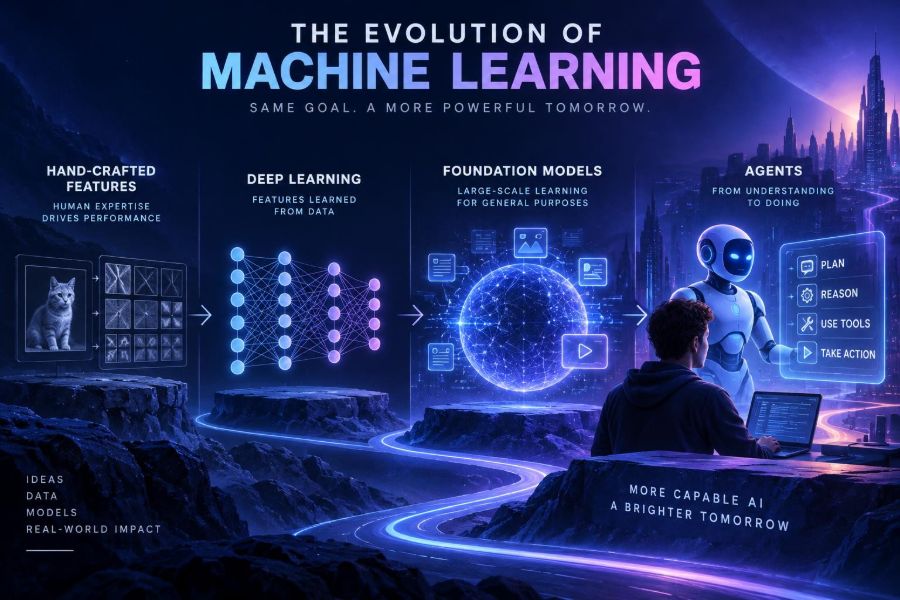

Machine learning has moved from carefully engineered spreadsheets and narrowly trained classifiers to systems that can read, write, see, reason over tools, and coordinate multi-step work. That shift is changing what teams build, how developers design software, and which skills create leverage.
This matters now because foundation models are no longer just research artifacts. They are becoming a practical layer in products, internal workflows, creative tools, and developer platforms—while agents are pushing that layer from answering questions toward taking bounded actions.
Understanding the evolution prevents two common mistakes: treating modern AI as magic, or treating it as merely a larger version of an old prediction model. The underlying ideas connect, but the engineering, risks, and opportunities are meaningfully different.
After reading, you will be able to identify the major eras of machine learning, choose an appropriate approach for a real problem, prototype a retrieval-powered AI feature, and design agent workflows with useful guardrails.
🧭 1. Start With the Big Picture
Machine learning is the practice of learning patterns from examples rather than writing every decision rule by hand. A model receives inputs, adjusts internal parameters during training, and produces an output such as a prediction, category, ranking, or generated response.
The field did not advance in a straight line. It evolved through changes in data availability, compute, algorithms, software tooling, and the kinds of tasks people wanted machines to perform.
| Era | Core idea | Typical output | Main constraint |
|---|---|---|---|
| Hand-crafted ML | People define useful signals | Score or class | Feature engineering effort |
| Deep learning | Networks learn representations | Vision, speech, text prediction | Data and compute |
| Foundation models | One broad model adapts to many tasks | Generated and transformed content | Reliability and context |
| Agents | Model plans and uses tools | Multi-step task completion | Control, evaluation, safety |
🧮 2. Understand the Hand-Crafted Feature Era
Early practical machine learning often depended on a domain expert deciding which measurable properties might predict an outcome. For email filtering, those properties could include word counts, sender reputation, punctuation frequency, and whether an attachment was present.
Those measurements are called features. A relatively small model then learned how much each feature should influence a result.
# A conceptual feature row for spam classification
features = {
    "contains_free": 1,
    "exclamation_count": 4,
    "sender_reputation": 0.18,
    "has_attachment": 1
}
# A trained classifier maps features to spam probability.
This approach remains valuable. Structured business data—transactions, inventory, telemetry, risk signals, and tabular records—often works extremely well with conventional models and carefully designed features.
🔍 3. Know What Feature Engineering Taught Us
Feature engineering forces a useful question: what evidence should influence a decision? It made model development more interpretable, but it also made progress slow when the raw input was unstructured.
A human can recognize a bicycle in a photo without listing every edge, texture, wheel shape, and visual angle. Traditional pipelines asked engineers to approximate those concepts manually, and those approximations frequently broke when the environment changed.
- Strength: efficient and transparent for well-defined structured problems.
- Weakness: fragile when language, images, audio, or behavior changes.
- Lesson: data definitions and evaluation criteria matter as much as model choice.
A common mistake is to assume older approaches are obsolete. If you need to predict late invoices from a clean table, a complex generative model may add cost and uncertainty without improving the decision.
🧠 4. See Why Deep Learning Changed the Pipeline
Deep learning uses multi-layer neural networks to learn useful representations directly from raw or lightly processed data. Instead of explicitly programming “detect a curved edge, then a wheel,” training can tune layers that gradually capture patterns relevant to the task.
This was especially powerful for images, speech, and language, where manually specifying every meaningful feature is difficult. Better accelerators, larger datasets, and improved training methods made these models increasingly practical.
The key shift was not that humans disappeared from the loop. Humans still choose objectives, curate data, define labels, inspect failures, and decide whether a system should be deployed.
🧱 5. Learn the Representation Hierarchy
A neural network converts an input into internal numerical representations. In image systems, early layers may respond to simple visual patterns, while later layers can support recognition of more abstract objects.
In language systems, tokens become vectors, and successive layers combine context to build representations of meaning, syntax, relationships, and likely continuations. These representations are learned from training objectives rather than explicitly authored rules.
# Simplified classification flow
input_text = "The package arrived damaged"
vector = encoder(input_text)       # learned representation
label = classifier(vector)         # e.g., "shipping issue"
Do not confuse a representation with human understanding. It is a useful learned encoding for statistical tasks, not proof of consciousness, intent, or reliable real-world judgment.
📚 6. Recognize the Rise of Pretraining
For years, many models were trained separately for each task. A team collected labeled examples, trained a model for one purpose, and repeated the process for another purpose.
Pretraining changed the economics. A model can first learn broad patterns from a large corpus using a general objective, then be adapted to a narrower job through prompting, fine-tuning, or additional examples.
Language modeling is an intuitive case: predict missing or next pieces of text across enormous and diverse corpora. To do that well, the model must learn many regularities of language and information, which later become useful for other tasks.
🌐 7. Define Foundation Models Clearly
A foundation model is a broadly pretrained model that can serve as a base for many downstream tasks. It may work with text alone or with multiple modalities such as images, audio, video, and structured inputs.
Its value comes from reuse. Instead of training a capable model from scratch for every application, builders can provide instructions, examples, documents, tools, or domain-specific adaptation.
| Adaptation method | Best for | What you provide | Watch out for |
|---|---|---|---|
| Prompting | Fast experiments | Instructions and examples | Ambiguous requests |
| Retrieval-augmented generation | Current private knowledge | Relevant source passages | Bad retrieval or stale content |
| Fine-tuning | Repeated specialized behavior | Curated input-output examples | Weak or narrow training data |
| Tool use | Live facts and actions | Well-defined functions or APIs | Unsafe permissions |
Capabilities, context limits, data policies, and pricing change quickly across providers. Check official documentation before selecting a model or sending production data to a service.
💬 8. Prompt Models Like a Product Builder
A prompt is not merely a question. In a product workflow, it is an interface contract describing the role, task, input, constraints, output format, and behavior when information is missing.
Start with a narrow task and observable acceptance criteria. Ask for structured output when another system or person needs to use the result consistently.
You are a support triage assistant.

Task: classify the customer message into one category:
billing, account_access, shipping, product_question, or other.

Return exactly this format:
category: <category>
confidence: <low|medium|high>
reason: <one sentence>

If the message lacks enough detail, set confidence to low.

Customer message:
{{message}}- Put critical constraints near the task, not in a vague closing sentence.
- Include two or three representative examples when classification is nuanced.
- Require the model to say when it lacks information.
- Test with messy, adversarial, short, and multilingual inputs.
🗂️ 9. Add Retrieval Before You Fine-Tune
When an assistant needs to answer from changing company knowledge, retrieval-augmented generation, often called RAG, is usually the first architecture to try. The system finds relevant content, places it in the model’s context, and asks for an answer grounded in that material.
This is different from teaching the model permanent facts. Retrieved material can be updated, inspected, permission-filtered, and cited in a user interface.
- Collect authoritative documents and remove duplicates or obsolete content.
- Split documents into coherent chunks with titles and metadata.
- Create vector representations for chunks and store them in a searchable index.
- Retrieve a small set of relevant chunks for each question.
- Instruct the model to answer only from those chunks or say it cannot find the answer.
- Evaluate retrieval quality and answer faithfulness separately.
question = "What is the return window for unopened items?"
passages = retrieve(question, filters={"audience": "customers"}, top_k=5)
answer = generate(
    system="Answer only using the supplied passages. If absent, say so.",
    context=passages,
    user=question
)
Common mistake: putting an entire document library into a prompt. Retrieval is not just a token-saving technique; it is a relevance, permissions, and maintainability strategy.
🧪 10. Fine-Tune Only for the Right Reasons
Fine-tuning adjusts a model using examples of the behavior you want. It can help with consistent style, specialized extraction formats, domain language, or a high-volume task where prompts alone remain unreliable.
It is usually not the best first fix for missing current facts. If the source of truth changes regularly, retrieval or a tool call is more maintainable.
# Example training record for structured extraction
{
  "input": "Meeting moved to Tuesday at 3 PM with Dana.",
  "output": {
    "event": "meeting",
    "date": "Tuesday",
    "time": "15:00",
    "attendee": "Dana"
  }
}- Use representative examples, including edge cases and refusal cases.
- Keep a held-out evaluation set that never enters training.
- Compare against a strong prompt-and-retrieval baseline.
- Review outputs for memorization, bias, and format failures.
🛠️ 11. Understand Tools as the Bridge to Action
Foundation models generate likely outputs, but business workflows often require live information or actions: look up an order, query a database, create a ticket, calculate a tax total, or schedule a meeting.
Tool calling gives the model a constrained way to request such operations. Your application validates the request, executes trusted code, and returns a result for the model to explain or use in its next step.
tools = {
  "lookup_order": {
    "description": "Fetch an order by its ID",
    "parameters": {"order_id": "string"}
  }
}

# Application-side rule: never let the model access the database directly.
# Validate order_id and enforce the current user's authorization first.
Think of the model as a planner and language interface, not as an authority. The application owns authentication, authorization, validation, logging, and irreversible actions.
🤖 12. Distinguish a Chatbot From an Agent
An agent is a system in which a model iterates toward a goal, often by selecting tools, observing results, and deciding the next step. A chatbot may be part of an agent, but a single response is not automatically agentic.
A useful agent loop is simple: interpret the goal, choose a permitted action, inspect the observation, then stop or continue within a budget. The most reliable agents tend to have narrow scopes and explicit workflows.
while steps < max_steps:
    action = model.choose_action(goal, state, available_tools)
    result = run_validated_tool(action)
    state.append(result)
    if model.can_finish(goal, state):
        break
return model.write_final_response(state)
Do not begin with an open-ended “autonomous employee.” Begin with a specific task such as reconciling one report, preparing a draft, or gathering facts for a human reviewer.
🧰 13. Build Your First Bounded Agent Step by Step
Consider an agent that prepares a weekly incident summary. It can search approved incident records, calculate simple totals, draft a report, and submit it for review. It cannot alter records or send the report externally.
- Write a clear goal: “Create a weekly summary from approved incident records.”
- List allowed tools and their input schemas.
- Define a maximum number of tool calls and a timeout.
- Require a human approval checkpoint before publishing.
- Log the prompt, tool requests, tool results, final output, and reviewer decision.
- Test failures: empty search, conflicting records, malformed dates, and permission denial.
You prepare internal incident summaries.
Use only the search_incidents and calculate_metrics tools.
Do not infer facts missing from tool results.
Draft a report with: period, totals, recurring themes, and uncertainties.
End with status: DRAFT_FOR_REVIEW.
This design has an important property: every meaningful capability is visible in code and policy, rather than hidden inside an expansive prompt.
📏 14. Evaluate Systems, Not Just Model Demos
A polished demo can conceal frequent failures. Evaluation must reflect the actual job, actual inputs, and actual consequences of being wrong.
Build a test set from real, privacy-safe examples. Label what a good answer looks like, then score dimensions separately instead of relying on a single vague impression.
- Correctness: Is the answer factually supported?
- Grounding: Does it rely on retrieved or tool-provided evidence?
- Completeness: Did it address the user’s task?
- Format: Can downstream software parse it?
- Safety: Did it refuse or escalate appropriately?
- Cost and latency: Is it viable at expected volume?
For agents, measure the entire trajectory: tool selection, argument validity, permission handling, number of steps, recovery behavior, and final result. A correct final paragraph does not excuse an unsafe action along the way.
🧯 15. Plan for Hallucinations and Failure Modes
Generative models can produce fluent but unsupported statements, commonly called hallucinations. They can also follow misleading instructions inside untrusted documents, misunderstand ambiguity, or use a tool with an invalid argument.
Reduce risk with architecture, not wishful wording.
- Ground factual answers in curated retrieval results or trusted tools.
- Separate untrusted content from system instructions.
- Validate structured outputs with schemas and reject invalid fields.
- Use allowlists for tools and least-privilege permissions.
- Confirm before purchases, publication, deletion, or external communication.
- Provide a human escalation path for high-impact cases.
A common mistake is asking a model to “never hallucinate” and considering the problem solved. Good instructions help, but verification and workflow controls do the real work.
🔐 16. Protect Privacy, Security, and People
AI systems can touch sensitive conversations, proprietary documents, customer records, source code, and personal data. Treat every new AI feature as a data-flow design exercise.
Document what enters the system, where it is processed, who can access it, how long it is retained, and what can appear in logs. Apply the same security rigor you would apply to any service with access to important data.
- Minimize data sent to a model; redact unnecessary identifiers where possible.
- Enforce document-level permissions before retrieval, not after generation.
- Never expose secrets, credentials, or unrestricted internal tools in prompts.
- Tell users when AI assists a decision or generates content.
- Use human review for decisions involving employment, credit, health, legal rights, or other high-impact outcomes.
Responsible use also means checking for unequal performance across users and contexts. A model that works well for common cases may fail disproportionately for minority dialects, accessibility needs, or less represented languages.
🏗️ 17. Choose the Smallest Effective Architecture
The best AI solution is not always the largest model or most autonomous workflow. Start from the user problem, risk level, data source, and measurable outcome.
| Need | Good starting point | Avoid |
|---|---|---|
| Predict a number from a table | Conventional supervised model | Adding a chat model without need |
| Summarize known documents | Prompt plus retrieval | Assuming the summary is source-free truth |
| Extract fields from text | Structured output and validation | Parsing uncontrolled prose |
| Answer live account questions | Retrieval plus permissioned tools | Putting account data in a static prompt |
| Perform repeatable multi-step work | Bounded agent with approvals | Unrestricted autonomy |
This principle improves reliability, cost, explainability, and rollout speed. Complexity should be earned by evidence from evaluation, not added because a trend sounds impressive.
🚀 18. Use This Quick-Start Checklist
Choose one repetitive, low-risk workflow where better drafting, classification, search, extraction, or summarization would save real time. Then work through this list before broad deployment.
- Define the user, decision, and success metric in one sentence.
- Collect a small, representative evaluation set before building.
- Try a clear prompt baseline first.
- Add retrieval for changing or private knowledge.
- Add tools only where live data or actions are necessary.
- Keep permissions narrow and require approval for consequential actions.
- Log failures, review them, and turn recurring failures into tests.
- Compare the result with the existing manual process.
- Document privacy, retention, ownership, and escalation rules.
- Expand scope only after the narrow workflow performs reliably.
The evolution from features to foundation models and agents is ultimately an evolution in system design: use learned intelligence where it helps, and surround it with data, tools, evaluation, and human judgment where it matters. 🤖🧭🚀