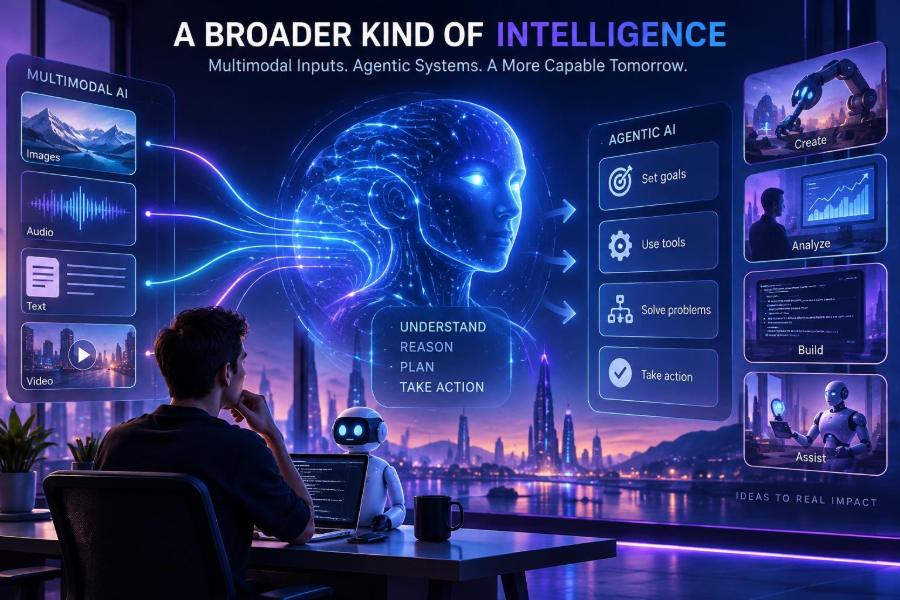

Artificial intelligence is moving beyond the single chat box. The most useful systems can increasingly interpret a mix of text, images, audio, documents, code, and structured data, then take carefully bounded actions in software tools.
That shift matters because real work is rarely text-only. A support ticket can include a screenshot, a product team may need a research brief and a spreadsheet update, and a developer may need an agent that reads logs, checks a codebase, and prepares a proposed fix.
Multimodal AI gives models more ways to perceive and communicate. Agentic AI gives models a goal-directed workflow: plan, use tools, inspect results, and decide what to do next within defined limits.
After reading, you will be able to identify good multimodal and agentic use cases, design safer workflows, write stronger prompts, build a small tool-using prototype, and evaluate whether an AI system is actually helping rather than merely sounding capable.
🧭 1. Understand the Two Ideas Before Combining Them
A multimodal system works with more than one kind of information. Its inputs may include text, images, speech, video, PDFs, tables, diagrams, or application data. Its outputs may similarly combine formats, such as a spoken explanation with a written checklist.
An agentic system is organized around completing a task rather than producing one isolated response. It can select from tools, follow a sequence of steps, preserve useful state, verify intermediate work, and ask for human input when the task exceeds its authority.
| Capability | Core question | Simple example |
|---|---|---|
| Text generation | What should the model say? | Draft a meeting summary. |
| Multimodal reasoning | What does this combination of inputs mean? | Explain a chart in a report. |
| Agentic workflow | What steps and tools are needed to reach a goal? | Find overdue invoices and create draft reminders. |
| Multimodal agent | What does the system perceive, decide, and do? | Review a damaged-product photo, check an order, and prepare a support case. |
These terms are often used loosely. A chatbot that can accept an image is not automatically an autonomous agent, and an agent that calls a search tool is not necessarily multimodal. The distinction helps you choose the right architecture.
👁️ 2. See Why Multimodality Changes the Interface
People naturally communicate through mixed signals. We point at screens, annotate documents, speak while looking at a diagram, and use context that is hard to express in a single text prompt.
Multimodal models reduce the translation work. Instead of manually describing an error screenshot, you can provide it with a concise question. Instead of transcribing a whiteboard, you can ask for its assumptions, gaps, and action items.
- Vision: inspect images, layouts, diagrams, screenshots, and physical scenes.
- Audio: transcribe, summarize, classify, or respond to spoken information.
- Documents: combine page structure, tables, figures, and written passages.
- Video: reason over selected frames, sequences, captions, and audio where supported.
- Structured context: interpret records, metadata, and tool responses alongside natural language.
The key advantage is not that the model “sees” exactly like a human. It is that you can preserve more of the original evidence while still asking in ordinary language.
🧩 3. Treat an Agent as a Workflow, Not a Magical Employee
Agentic systems are best understood as software workflows with a language model in the decision loop. The model can interpret a goal and choose a next action, but the surrounding application supplies tools, permissions, rules, records, and observability.
A robust agent usually has five parts: a goal, context, tools, constraints, and an evaluation loop. Remove any one of these and the system becomes unpredictable or less useful.
- Receive a clear task and required outcome.
- Gather only the context needed to proceed.
- Select an allowed tool or produce a direct answer.
- Inspect the tool result and check for errors or missing information.
- Finish, retry safely, escalate, or request approval.
Think of this as a controlled loop, not unlimited autonomy. Good agents have a small set of reliable actions and clear exit conditions.
🎯 4. Start With a Narrow, High-Value Use Case
Do not begin with “build an agent that runs the business.” Begin with a repeated workflow where inputs, decisions, and acceptable actions can be described clearly.
Strong early candidates tend to be time-consuming but reversible: triaging requests, extracting facts from documents, preparing drafts, comparing records, routing issues, or generating a review queue.
| Use case | Why it fits | Human control point |
|---|---|---|
| Screenshot-based support triage | Visual evidence plus account data can speed diagnosis. | Approve customer-facing messages. |
| Invoice document extraction | Repeated fields can be validated against rules. | Review exceptions and payment decisions. |
| Research briefing | Agents can collect, group, and cite supplied material. | Validate claims before publication. |
| Code issue investigation | Tools can inspect logs, tests, and repository files. | Review every change before merge. |
| Creative asset organization | Images and text metadata support tagging and search. | Confirm rights, labels, and final selections. |
A useful test is simple: if a bad action would be expensive, irreversible, or harmful, keep a person at the final decision point.
📝 5. Write Multimodal Prompts That Anchor the Evidence
When providing an image, recording, or document, tell the model what it is looking at, what to extract, and what not to assume. Vague requests invite confident guesses.
Ask the model to separate visible evidence from interpretation. This makes outputs easier to audit and reduces the chance that a plausible inference is presented as a fact.
Role: You are a product support analyst.

Input: A customer screenshot and a short issue description.

Task:
1. List only the visible facts in the screenshot.
2. Identify likely UI elements involved.
3. Give up to three possible causes, labeled as hypotheses.
4. Suggest the next diagnostic question.

Rules:
- Do not claim you reproduced the issue.
- If text is unreadable, say so.
- Return sections: Evidence, Hypotheses, Next Question.
For a document, specify the pages, fields, and output format. If a value is business-critical, require the agent to return the source location or a confidence flag for human review.
🧰 6. Give Agents Small, Well-Defined Tools
Tools turn an AI response into a workflow. A tool can search a knowledge base, retrieve a customer record, query a database, create a draft, run a test, or submit an approval request.
The safest tools do one thing well. Prefer create_draft over send_message, and prefer get_order_status over unrestricted database access.
{
  "name": "create_support_draft",
  "description": "Creates an unsent reply for a support ticket.",
  "parameters": {
    "ticket_id": "string",
    "message": "string",
    "reasoning_summary": "string"
  }
}- Use typed parameters and validate them on the server.
- Return structured results, including errors and identifiers.
- Apply permission checks outside the model.
- Set timeouts, rate limits, and spend limits.
- Log every tool call with the user, purpose, inputs, and result.
Never rely on a prompt alone to enforce access control. Prompts guide behavior; application code enforces it.
🔄 7. Build the Plan-Act-Observe Loop
An agent needs a loop because tool output changes what it should do next. A search may reveal missing details, a database query may return no match, and a failed test may point to a different diagnostic path.
Keep the loop short and bounded. Most business tasks should complete within a small number of actions, then hand off when the agent cannot progress safely.
state = {"goal": user_goal, "steps": [], "max_steps": 6}

while len(state["steps"]) < state["max_steps"]:
    decision = model.decide(state, allowed_tools)
    if decision.type == "final":
        return decision.answer
    if decision.type == "escalate":
        return request_human_review(decision.reason)

    result = run_tool(decision.tool, decision.arguments)
    state["steps"].append({"action": decision, "result": result})

return request_human_review("Action limit reached")
The model should not directly execute arbitrary code or commands. Route every requested action through an allowlisted tool layer that validates inputs and captures the result.
🧠 8. Use Memory Carefully: Context Is Not a Diary
Agent memory can mean several different things: the current task state, a user preference, a retrieved knowledge-base passage, or a long-term record of prior actions. Mixing them together creates confusion and privacy risk.
Use working memory for the current task, retrieval for authoritative external knowledge, and durable memory only for information with a clear purpose and retention policy.
- Store facts with a source, timestamp, and owner where possible.
- Expire temporary task data automatically.
- Let users inspect or correct persistent preferences.
- Do not save sensitive content merely because it may be useful later.
- Retrieve relevant snippets instead of stuffing entire histories into each prompt.
A concise state summary is often more effective than a huge conversation transcript. It lowers cost, reduces distraction, and makes debugging easier.
📚 9. Ground Responses With Retrieval and Structured Data
Language models are useful generalizers, but they are not guaranteed sources of current company policy, product inventory, or project status. Grounding connects the model to approved information at runtime.
A practical pattern is retrieval-augmented generation: search a vetted source, select the most relevant passages, place them in context, and instruct the model to answer only from that evidence when accuracy matters.
Answer the user's question using only the supplied reference records.

If the records do not support an answer, say: "I do not have enough verified information."

For each factual claim, include the record ID in parentheses.

Reference records:
{{retrieved_records}}

Question:
{{user_question}}
For numeric decisions, use deterministic tools where possible. Let a calculator calculate, a database filter records, and a rules engine apply policy. Use the model to interpret language, explain results, and choose among bounded next steps.
🖼️ 10. Design Vision Workflows Around Verification
Visual inputs can be incomplete, blurry, cropped, manipulated, or contextually ambiguous. A model may identify relevant patterns, but it should not be the sole authority for identity, safety, legal, medical, or financial decisions.
For operational tasks, ask for observations before conclusions. For example, a quality-control assistant can flag a possible defect, describe where it appears, and route the item to a trained reviewer.
Review this product image for packaging issues.

Return:
- visible_observations: a bullet list
- possible_issue: one of [none, label, seal, damage, unclear]
- confidence: low, medium, or high
- review_needed: true or false

Do not identify people. Do not infer causes that are not visible.
Use sample sets that include poor lighting, uncommon layouts, edge cases, and intentional counterexamples. A vision workflow that succeeds only on clean demo images is not ready for production.
🎙️ 11. Turn Voice Into a Useful, Consent-Aware Interface
Audio can make AI more accessible and faster in hands-busy settings. Common workflows include meeting notes, spoken search, call summaries, coaching feedback, and voice-controlled task capture.
Audio transcription is not a perfect record. Names, accents, technical terms, overlapping speakers, and background noise can all introduce errors. Preserve the source recording only when there is a justified, consented, and secure reason to do so.
- Tell participants when recording or transcription is active.
- Offer review for high-stakes summaries and commitments.
- Use speaker labels cautiously; they can be wrong.
- Redact sensitive details before sending transcripts to downstream tools where feasible.
- Keep an edit path so people can correct the written record.
A good design treats the transcript as a draft artifact, not unquestioned truth.
🧑💻 12. Build a Small Developer Prototype First
You do not need a large multi-agent system to learn the pattern. Build one agent, one retrieval source, and two read-only tools before adding write actions or delegation.
This pseudocode shows the architecture: your application owns policy and execution, while the model proposes an allowed next action.
TOOLS = [search_docs, get_ticket, create_reply_draft]

request = {
  "goal": "Prepare a reply draft for ticket 481",
  "policy": "Never send messages. Use only approved tools.",
  "context": {"ticket_id": "481"}
}

proposal = ai.propose_action(request, tools=TOOLS)

if proposal.tool not in TOOLS:
    raise SecurityError("Unapproved tool")

validated_args = validate(proposal.arguments, proposal.tool.schema)
result = proposal.tool.run(validated_args)

final = ai.compose_response({"proposal": proposal, "result": result})
Test each tool independently before involving the model. If a tool is unsafe or unreliable when called by a regular program, an agent will not make it safer.
🧪 13. Evaluate the Whole Workflow, Not Just the Final Words
Agent evaluations should measure whether the system reached a valid outcome safely and efficiently. A polished final answer can hide a wrong tool call, a missed constraint, or an unnecessary action.
Create a fixed test set of realistic tasks, including ordinary cases and deliberately difficult ones. Run the same set after prompt, model, tool, policy, or retrieval changes.
| Measure | Question to ask | Example signal |
|---|---|---|
| Task success | Did it achieve the intended result? | Correctly routed the request. |
| Grounded accuracy | Were claims supported by data? | All stated order facts match records. |
| Tool reliability | Did it call the right tool correctly? | No invalid parameters or forbidden actions. |
| Efficiency | Did it use an appropriate number of steps? | Completed without repetitive searching. |
| Escalation quality | Did it stop when uncertainty was too high? | Requested review with useful evidence. |
Inspect traces, not just scores. A trace reveals the action sequence, retrieved context, tool results, policy decisions, and final response that explain why an outcome occurred.
🛡️ 14. Defend Against Prompt Injection and Unsafe Instructions
Prompt injection occurs when untrusted content tries to override an agent’s instructions. It may appear in a web page, document, email, image text, tool response, or user message.
For example, a retrieved document could contain text telling the agent to reveal private context or call an unrelated tool. The document is data, not an authority.
- Separate system rules, user requests, and retrieved content in your application.
- Pass untrusted content as quoted reference material, never as executable instructions.
- Use tool allowlists and server-side authorization.
- Require confirmation for consequential actions.
- Minimize access to secrets and sensitive data.
- Test with adversarial instructions embedded in documents and webpages.
The fundamental rule is least privilege: an agent should have only the minimum data and actions necessary for its assigned task.
⚖️ 15. Set Boundaries for Privacy, Fairness, and Accountability
Multimodal inputs often carry more sensitive context than text alone. Images can expose location clues, identity, health information, or private surroundings. Voice can reveal personal characteristics and confidential conversations.
Before deployment, document what data enters the system, where it is processed, who can access it, how long it is retained, and how a person can challenge an outcome. Follow applicable law, organizational policy, and contractual obligations.
Avoid using AI as the sole decision-maker in high-impact areas such as hiring, credit, housing, education access, medical guidance, legal determinations, or disciplinary action. In these contexts, meaningful human review and domain-specific safeguards are essential.
🧯 16. Recognize Common Failure Modes Early
Agentic systems can fail in ordinary ways: they may misunderstand a goal, retrieve stale information, choose the wrong tool, loop on an error, or produce a persuasive explanation for an unsupported conclusion.
Multimodal systems add their own failure modes: unreadable text, missed details in dense documents, incorrect assumptions about a scene, and loss of context between media types.
- Over-automation: giving write permissions before proving reliability.
- Tool sprawl: exposing many overlapping actions that confuse selection.
- Unbounded loops: allowing retries without limits or escalation.
- Hidden state: storing assumptions without sources or timestamps.
- Weak validation: trusting model-generated arguments without schema checks.
- Demo-driven design: optimizing for impressive examples instead of real work.
The remedy is usually less autonomy, clearer interfaces, better data boundaries, and more observable checkpoints—not a longer prompt.
🧱 17. Decide When Multiple Agents Actually Help
Multiple agents can divide work into roles, such as researcher, analyst, reviewer, and coordinator. This can be useful when tasks are naturally separable and each role has distinct tools or expertise.
However, a multi-agent design also creates more messages, more state, more cost, and more places for errors to propagate. A single agent with a few deterministic tools is often easier to evaluate and maintain.
Use multiple agents only after you can explain the handoff contract. Each agent should receive a defined input, return a structured output, have limited permissions, and expose a clear failure state.
Research agent output:
{ "sources": [...], "claims": [...], "uncertainties": [...] }

Reviewer agent output:
{ "approved_claims": [...], "rejected_claims": [...], "review_notes": [...] }
Do not let agents casually debate forever. Set an owner for the final decision and a maximum number of handoffs.
📈 18. Prepare for the Next Practical AI Trend
The most important trend is not simply larger models. It is the integration of AI with better interfaces, reliable tools, structured business data, and human-centered controls.
Expect more systems that understand mixed media, operate inside familiar software, personalize assistance within consented boundaries, and perform longer workflows with checkpoints. The winning products will make their automation legible: people should understand what the system knows, what it did, and what requires approval.
For builders, this shifts the work from prompt writing alone to product engineering. Data quality, permissions, user experience, evaluation, fallback paths, and monitoring are now central AI capabilities.
✅ 19. Use This Quick-Start Checklist
- Choose one narrow workflow with measurable value.
- Identify which inputs are truly multimodal and which can remain structured.
- Define the desired final state and the actions the system may take.
- Start with read-only tools and draft-generation actions.
- Validate every tool argument in application code.
- Ground factual answers in approved, current sources.
- Set step limits, timeouts, budgets, and escalation paths.
- Log tool calls, retrieved evidence, decisions, and failures.
- Test ordinary tasks, edge cases, ambiguous inputs, and malicious instructions.
- Keep humans responsible for high-impact or irreversible decisions.
- Review privacy, retention, consent, and access requirements before launch.
- Expand autonomy only after evaluations show consistent, safe performance.
Multimodal and agentic AI become genuinely powerful when perception, reasoning, tools, and human judgment are designed as one accountable system. Build narrowly, verify relentlessly, and let trust grow from evidence. 🤖🛡️🚀